Table of Contents Link to heading
- Latency
- Quality of Service (QoS) Models
- Modular QoS CLI (MQC)
- Classification
- Marking
- Policing
- Shaping
- Congestion Management
- Congestion Avoidance
Latency Link to heading
It is recommended that a network latency should not exceed 400 ms, and for real-time traffic, network latency should be less than 150 ms.
Causes of network latency include:
- Propagation delay (fixed) is the time it takes for a packet to travel from the source to a destination at the speed of light over a medium such as fiber-optic cables or copper wires.
- Serialisation delay (fixed) is the time it takes to place all the bits of a packet onto a link
- Processing delay (fixed) is the fixed amount of time it takes for a networking device to take the packet from an input interface and place the packet onto the output queue of the output interface.
- Delay variation (variable) or jitter describes how packets arrive at
the destination at varying intervals.
- Low jitter = smooth voice/video
- High jitter = choppy audio, frozen video, poor user experience
Quality of Service (QoS) Models Link to heading
Best effort Link to heading
Integrated Services (IntServ) Link to heading
IntServ uses Resource Reservation Protocol (RSVP) to reserve resources throughout a network for a specific application and to provide call admission control (CAC) to guarantee that no other IP traffic can use the reserved bandwidth.
To be able to provide end-to-end QoS, all nodes, including the endpoints running the applications, need to support, build, and maintain RSVP path state for every single flow.
- Created for real-time applications
- Unused reserved bandwidth is wasted
- Highest guarantee of QoS but resource-intensive
- Precise but not scalable
Differentiated Services (DiffServ) Link to heading
DiffServ divides IP traffic into classes and marks it based on business requirements.
As IP traffic traverses a network, each network device identifies the packet class by its marking and services the packets according to this class.
Modular QoS CLI (MQC) Link to heading
It is a 3-step framework:
1. class-map     → Identify traffic
2. policy-map    → Decide what to do
3. service-policy→ Apply to interface
class-map
Link to heading
Used to match traffic.
Common match methods:
| Match Type | Example |
|---|---|
| ACL | match access-group |
| DSCP | match dscp ef |
| Protocol | match protocol http |
| VLAN | match vlan 10 |
| NBAR | match protocol citrix |
All traffic that is not matched by any of the user-defined traffic classes is referred to as unclassified traffic, and is treated by the default class called class-default.
Unclassified traffic, if not applied any QoS actions, is best-effort traffic.
Identifies voice traffic
ip access-list extended VOICE-TRAFFIC
 10 permit udp any any range 16384 32767
 20 permit udp any range 16384 32767 any
Defines Traffic Classification Criteria
class-map match-all VOIP-TELEPHONY
 match access-group name VOICE-TRAFFIC
 match dscp ef

class-map match-any P2P
 match protocol bittorrent
 match protocol soulseek
policy-map
Link to heading
Used to define action per class
Common QoS Actions:
| Action | Purpose |
|---|---|
| priority | LLQ (low-latency queue) |
| bandwidth | Guaranteed bandwidth |
| police | Limit traffic |
| shape | Smooth traffic |
| set dscp | Mark packets |
| queue-limit | Control buffer |
policy-map QUEUING
 class VOIP-TELEPHONY
 priority level 1 percent 30
 class P2P
 bandwidth percent 10
 class class-default
service-policy
Link to heading
Attach policy to interface.
interface GigabitEthernet1
 service-policy output QUEUING
Core MQC Actions Link to heading
Priority Queue (LLQ – Low Latency Queue) Link to heading
Used for:
- Voice
- Video conferencing
- Real-time applications
class VOICE
 priority percent 30
📌 Key rules:
- Strict priority
- Policed automatically
- Prevents starvation
Bandwidth Guarantee (Class-based weighted fair queuing (CBWFQ)) Link to heading
class DATA
 bandwidth percent 40
Guarantees minimum bandwidth under congestion.
Policing (Traffic Rate Limiting) Link to heading
Used to drop or remark excess traffic
class BULK
 police 10000000 conform-action transmit exceed-action drop
10 Mbps policing.
Shaping (Traffic Smoothing) Link to heading
Used mainly on WAN links
policy-map SHAPE-10M
 class class-default
  shape average 10000000
Verification Link to heading
show policy-map interface gi0/1
show class-map
show policy-map
Classification Link to heading
Packet classification uses traffic descriptors to categorise an IP packet within a specific class.
Packet classification should take place at the network edge, as close to the source of the traffic as possible.
The following traffic descriptors are typically used for classification:
- Internal: QoS groups (locally significant to a router)
- Layer 1: Physical interface, subinterface, or port
- Layer 2: MAC address and 802.1Q/p class of service (CoS) bits
- Layer 2.5: MPLS experimental (EXP) bits
- Layer 3: Differentiated Services Code Points (DSCP), IP Precedence (IPP), and source/destination IP address
- Layer 4: TCP or UDP ports
- Layer 7: Next-Generation Network-Based Application Recognition (NBAR2)
Marking Link to heading
Packet marking uses a traffic descriptor to change a field within a packet or a frame header.
The following traffic descriptors are used for marking traffic:
- Internal: QoS groups
- Layer 2: 802.1Q/p class of service (CoS) bits
- Layer 2.5: MPLS experimental (EXP) bits
- Layer 3: Differentiated Services Code Points (DSCP) and IP Precedence (IPP)
Layer 2 Marking - Class of Service (CoS) Link to heading
- Found in the 802.1Q VLAN field (32 bits)
- A 3-bit 802.1p field named Priority Code Point (PCP)
- Drawback: frames lose their CoS markings when traversing a non-802.1Q link or a Layer 3 network.
| PCP Value (Priority) | Acronym | Traffic Type |
|---|---|---|
| 0 (lowest) | BK | Background |
| 1 (default) | BE | Best effort |
| 2 | EE | Excellent effort |
| 3 | CA | Critical applications |
| 4 | VI | Video (< 100 ms latency & jitter) |
| 5 | VO | Voice (< 10 ms latency & jitter) |
| 6 | IC | Internetwork control |
| 7 (highest) | NC | Network control |
Layer 3 Marking Link to heading
- Found in the DiffServ (DS) field (8 bits)
- Legacy name is Type of Service (ToS) field
- Preserved end-to-end and mitigates Layer 2 marking’s drawback.
IP Precedence (IPP) Link to heading
- A 3-bit field
- Replaced by DSCP
DiffServ Code Point (DSCP) Link to heading
- A 6-bit field
- Routers apply Per-Hop Behaviours (PHB) at every hop based on DSCP.
Per-Hop Behaviours (PHB) Link to heading
Class Selector (CS) Link to heading
CS values map to old IP Precedence
DSCP = CSn = 8n
| CS | DSCP | Legacy |
|---|---|---|
| CS0 | 0 | BE |
| CS1 | 8 | Low priority |
| CS2 | 16 | Standard |
| CS3 | 24 | Signalling |
| CS4 | 32 | Video |
| CS5 | 40 | Voice signalling |
| CS6 | 48 | Network control |
| CS7 | 56 | Routing protocol |
Default Forwarding (DF) Link to heading
Used for best-effort service, equal to CS0.
Expedited Forwarding (EF) Link to heading
EF packets are placed in a strict priority queue with minimal delay, jitter, loss.
Routers forward EF traffic immediately, ahead of other classes.
Fixed DSCP: 46
Used for:
- IP Telephony
- Voice RTP
- Critical interactive traffic
Assured Forwarding (AF) Link to heading
AF ensures that traffic receives better-than-best-effort service but does not guarantee absolute delivery.
AF format:
AFxy
x = class priority (1–4)
y = drop precedence (1–3)

DSCP = 8x + 2y
Example: AF41
- Class 4 means highest priority (less than EF)
- Low drop precedence of 1
- DSCP = 8*4 + 2*1 = 34
| AF | Binary | Decimal |
|---|---|---|
| AF11 | 001010 | 10 |
| AF21 | 010010 | 18 |
| AF31 | 011010 | 26 |
| AF41 | 100010 | 34 |
Trust Boundary Link to heading
The point where the network stops trusting incoming DSCP markings.
- Trust IP phones (DSCP 46)
- Do NOT trust PCs (remark PC -> BE or CS0)
- Used only on phone ports / uplinks
Trust IP Phones
interface g0/1
 mls qos trust device cisco-phone
 mls qos trust cos
Do not trust PCs
interface g0/2
 mls qos cos override
Policing Link to heading
- Purpose: Enforce traffic rate limits by dropping or remarking excess traffic with a lower priority.
- Used for: ingress and egress traffic
- Example: Limit guest network traffic to 2 Mbps, and drop excess packets if the limit is exceeded.
Shaping Link to heading
- Purpose: Smooth traffic flow by buffering and delaying excess traffic.
- Used for: egress traffic
- Example: Shape video traffic to 5 Mbps, buffering excess packets to avoid bursts.
Congestion Management Link to heading
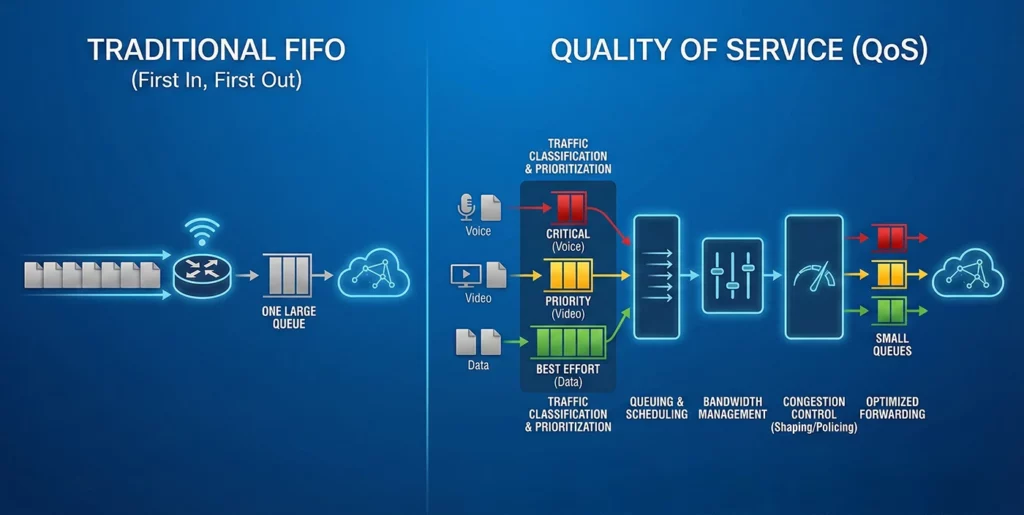
FIFO (First In, First Out) Link to heading
- One queue
- First packet in = first out
- No classification, no priority
- Drops packets during congestion (tail drop)
- Default when QoS is not configured
Round Robin (RR) Link to heading
- Multiple queues
- Each queue sends 1 packet per turn
- Equal turns, not equal bandwidth
- No priority
Weighted Round Robin (WRR) Link to heading
- Like RR but with weights
- Higher weight = more packets per round
- Still affected by packet size
Weighted Fair Queuing (WFQ) Link to heading
- Automatically classifies flows
- Each flow gets a queue
- Small/interactive flows preferred
- Used on low-speed links (legacy behaviour)
Priority Queuing (PQ) Link to heading
- Multiple priority levels (High → Low)
- Always serves highest queue first
- Can cause starvation
Custom Queuing (CQ) Link to heading
- Admin defines:
- Number of queues
- Bytes per queue per round
- Prevents starvation
- Legacy feature
CBWFQ (Class-Based WFQ) Link to heading
- You define traffic classes
- Assign bandwidth per class
- No strict priority by default
- Main enterprise method
LLQ (Low Latency Queuing) Link to heading
- CBWFQ + strict priority queue (PQ)
Congestion Avoidance Link to heading
Tail Drop Link to heading
- Default method
- Drops packets only when queue is full
- Can cause global synchronisation (all TCP flows slow down together)
- Reactive (too late)
RED (Random Early Detection) Link to heading
- Drops packets before queue is full
- Based on average queue depth
- Drops randomly
- Reduces global synchronisation
- Not QoS-aware
WRED (Weighted RED) Link to heading
- RED + DSCP/IP Precedence aware
- Lower-priority traffic dropped earlier
- Higher-priority traffic dropped later
- Used with CBWFQ / DiffServ