Table of Contents Link to heading
- Access Control Lists (ACLs)
- Creating ACLs - Order Matters
- How ACLs Work
- Valid Protocol ACL Numbers
- Wildcard Masking
- Types of ACLs
Access Control Lists (ACLs) Link to heading
Common ACL functions include the following:
- Filtering packets internally
- Protecting the internal network from illegal Internet access
- Restricting access to virtual terminal ports
- Screening out certain hosts to either allow or deny access to part of your network
- Granting or denying users permission to access only certain types of applications, such as FTP or HTTP
These lists tell the router’s interface what kinds of packets to accept/deny. Acceptance and denial can be based on certain specifications, such as source address, destination address, upper-layer protocol, TCP/UDP port number, or application.
ACLs must be defined on a per-protocol basis. For example, if your router interface were configured for IP, AppleTalk, and IPX, you would need to define at least three ACLs.
Creating ACLs - Order Matters Link to heading
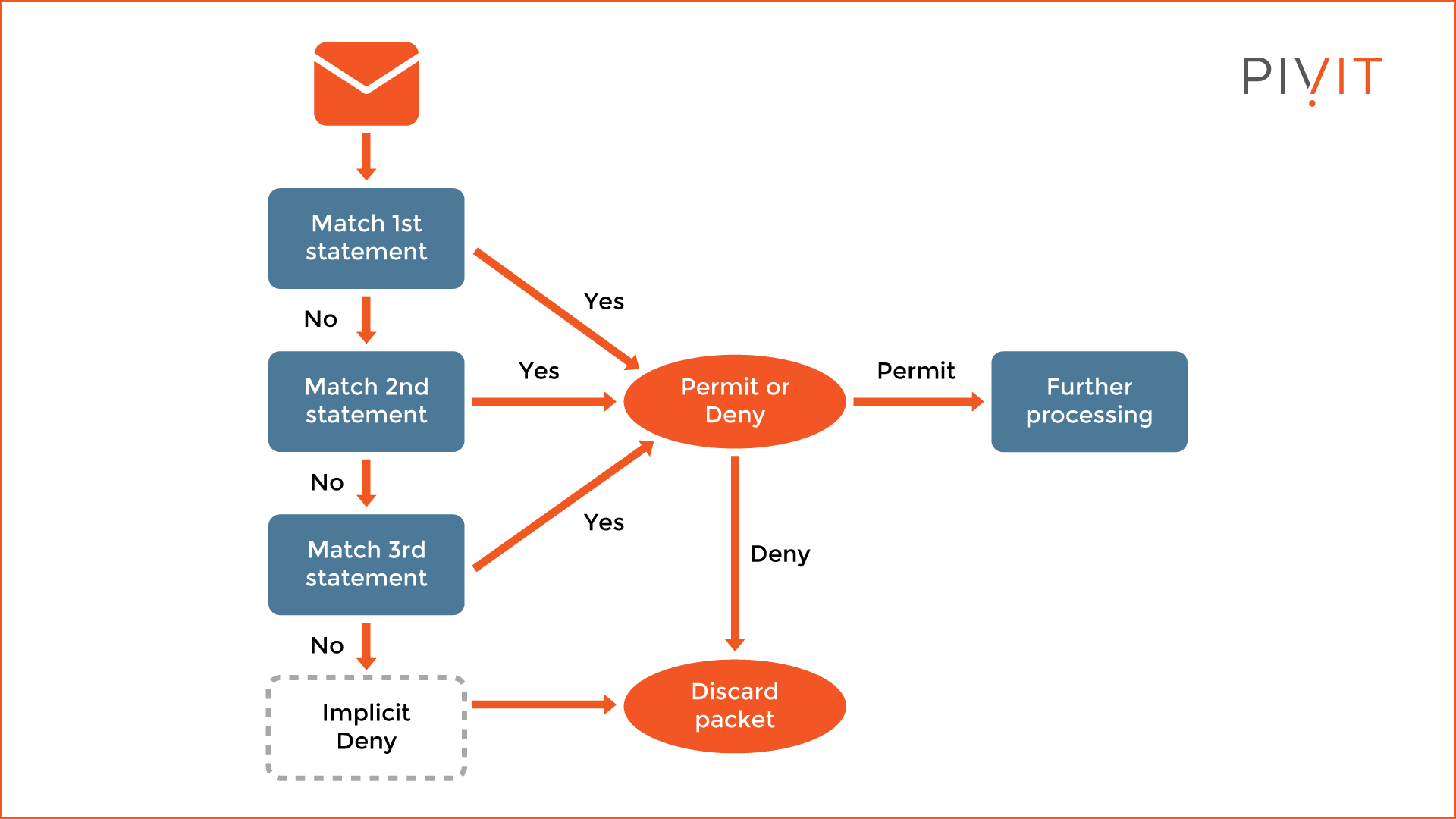
As traffic enters or exits a router’s interface, where an ACL is applied, Cisco IOS Software compares the packet against the rules defined in the ACL. Statements are evaluated in the order they were entered into the ACL by the network administrator. The packet is compared, one at a time in sequence, until a match is found. After a match is found, the action specified in the line matching the traffic in question is taken. No more conditions are checked.
How ACLs Work Link to heading
As a packet enters an interface, the router checks to see whether the packet is routable or bridgeable. Now the router checks whether the inbound interface has an ACL. If one exists, the packet is tested against the conditions in the list. If the packet is allowed, it then is checked against routing table entries to determine the destination interface. ACLs filter not packets that originate in the router itself, but packets from other sources.
Next, the router checks whether the destination interface has an ACL. If it does not, the packet can be sent to the destination interface directly; for example, if it will use E0, which has no ACLs, the packet uses E0 directly
If all the ACL statements are unmatched, the router drops the packet by default
due to an implicit deny any statement. Although the statement is not there, it
is always at the end of every ACL.
A packet that is denied access to the destination is discarded and dropped into the bit bucket - the destination of discarded bits (dropped packets), as determined by the router.
Valid Protocol ACL Numbers Link to heading
| Protocol | Range |
|---|---|
| IP | 1 to 99 |
| Extended IP | 100 to 199 |
| AppleTalk | 600 to 699 |
| IPX | 800 to 899 |
| Extended IPX | 900 to 999 |
| IPX Service Advertising Protocol | 1000 to 1099 |
Wildcard Masking Link to heading
Wildcard any
Link to heading
Instead of using this:
Router(config)# access-list 1 permit 0.0.0.0 255.255.255.255
Use this:
Router(config)# access-list 1 permit any
Wildcard host
Link to heading
Instead of using this:
Router(config)# access-list 1 permit 172.30.16.29 0.0.0.0
Use this:
Router(config)# access-list 1 permit host 172.30.16.29
Types of ACLs Link to heading
Standard ACLs Link to heading
Standard ACLs either permit or deny access for an entire protocol suite (such as IP), based on the network, subnet, and host addresses.
There are three methods to create a standard ACL:
- Router(config)# access-list acl_# {deny | permit} source_IP_# [source_wildcard_#]
- Router(config)# access-list acl_# {deny | permit} host IP_#
- Router(config)# access-list acl_# {deny | permit} any
acl_# must be between 1 and 99 or 1300 and 1999.
The no form of this command is used to remove a standard ACL:
Router(config)# no access-list acl_#
In the first method, if source_wildcard_# is not defined, the default mask is used, which is 0.0.0.0, meaning an individual host address.
To link an existing ACL to an interface:
Router(config)# interface interface_#
Router(config-if)# ip access-group {acl_# | acl_name} {in | out}
Extended ACLs Link to heading
Whereas standard ACLs can prevent or deny only an entire protocol suite, extended ACL gives you the capability to “nitpick” which protocol in the suite you want to deny or allow.
Named ACLs Link to heading
Named ACLs can be either standard or extended. They provide more flexibility, such as editing individual entries without deleting the entire ACL.
To create a named ACL:
Router(config)# ip access-list {standard | extended} acl_name
Router(config-std-nacl)# permit | deny parameters
Router(config-ext-nacl)# permit | deny protocol source destination [options]
PACLs (Port ACLs) Link to heading
PACLs can filter both IP and non-IP traffic. They are useful for restricting access at the edge of the network, such as user-facing switch ports.
To apply a PACL:
Switch(config)# interface interface_#
Switch(config-if)# ip access-group acl_name in
VACLs (VLAN ACLs) Link to heading
Unlike PACLs, VACLs can filter traffic flowing across a VLAN, including traffic that never leaves the switch.
To configure a VACL:
Switch(config)# ip access-list extended acl_name
Switch(config-ext-nacl)# permit | deny protocol source destination
Switch(config)# vlan access-map map_name sequence_#
Switch(config-access-map)# match ip address acl_name
Switch(config-access-map)# action {forward | drop}
Switch(config)# vlan filter map_name vlan-list vlan_#
ACL Comparison Table Link to heading
| Type | Filtering Criteria | Range / Identifier | Best Placement | Notes |
|---|---|---|---|---|
| Standard ACLs | Source IP address only | 1–99, 1300–1999 | Closest to destination | Simple, but less granular. |
| Extended ACLs | Source & destination IP, protocol type, TCP/UDP ports, etc. | 100–199, 2000–2699 | Closest to source | More granular control, can filter specific protocols. |
| Named ACLs | Same as Standard or Extended, but referenced by name | Descriptive name (instead of number) | Flexible (depends on type) | Easier to manage and edit; supports incremental changes. |
| PACLs | Filters IP and non-IP traffic entering a Layer 2 port | Applied to interface (no number range) | On switch ports | Inbound only; useful for edge/user-facing ports. |
| VACLs | Filters traffic within a VLAN (routed or switched) | VLAN access-map with ACL reference | Applied to VLANs | Can block intra-VLAN traffic; supports forward/drop actions. |
PACL, VACL, and PACL Interaction Link to heading
When a PACL, a VACL, and a RACL are all configured in the same VLAN, the ACLs are applied in a specific order, depending on whether the incoming traffic needs to be bridged or routed.
Bridged traffic processing order (within the same VLAN):
- Inbound PACL on the switchport (for example, VLAN 10)
- Inbound VACL on the VLAN (for example, VLAN 10)
- Outbound VACL on the VLAN (for example, VLAN 10)
Routed traffic processing order (across VLANs):
- Inbound PACL on the switchport (for example, VLAN 10)
- Inbound VACL on the VLAN (for example, VLAN 10)
- Inbound ACL on the SVI (for example, SVI 10)
- Outbound ACL on the SVI (for example, SVI 20)
- Outbound VACL on the VLAN (for example, VLAN 20