Table of Contents Link to heading
- Why Ansible Is a Good Fit for Network Automation
- Installing Ansible and Configuring Inventory
- Automating Network Tasks with Playbooks
- AWX: Centralised Ansible Management
- Operational Best Practices
- Conclusion
Network configuration is inherently repetitive: new devices get the same baseline hardening, VLANs get pushed to every switch in a fabric, ACLs get updated across all firewalls simultaneously. Manual execution of these tasks doesn’t scale, introduces inconsistency, and leaves no auditable record of what changed and when. Ansible addresses this by externalising configuration intent into playbooks that are version-controlled, idempotent, and executable across an entire inventory in a single run.
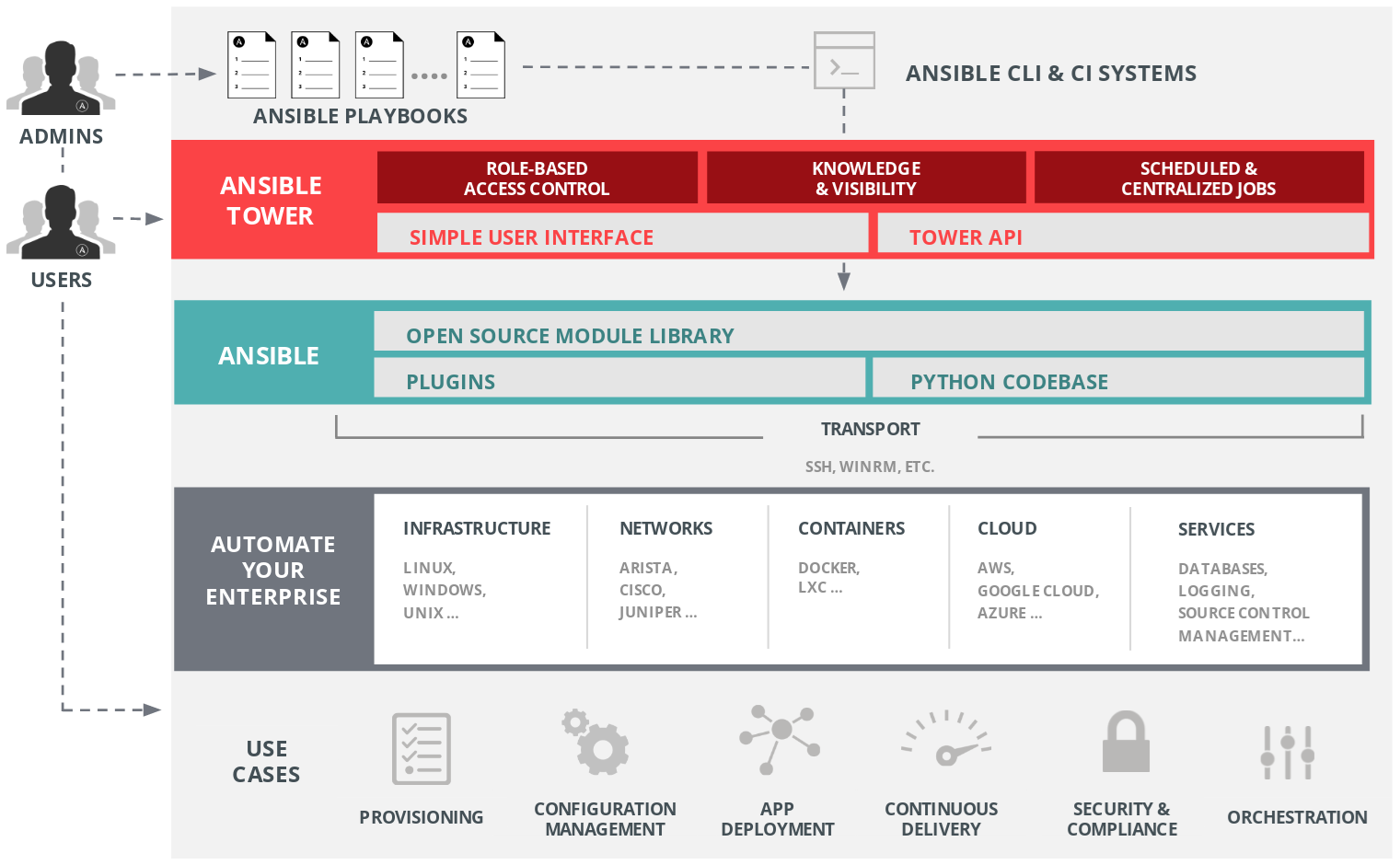
AWX — the open-source upstream of Red Hat Ansible Automation Platform — adds the operational layer that makes Ansible viable in team environments: a web interface, RBAC, scheduling, and an API that integrates with the rest of your toolchain.
Why Ansible Is a Good Fit for Network Automation Link to heading
Network engineers spend a disproportionate amount of time on tasks that are high in execution volume but low in decision complexity: pushing configs, collecting facts, running diagnostics, rotating credentials. These are exactly the tasks that automation handles well, and exactly the tasks where manual execution introduces the most human error.
Ansible is particularly well-suited to network automation because it operates agentlessly over SSH (or vendor-specific transport like NETCONF), requires no agent deployment on managed devices, and models configuration state declaratively — you describe what the device should look like, and Ansible determines what changes are needed to get there.
Key Benefits of Ansible for Network Operations Link to heading
- No agents required: Ansible connects directly via SSH — no software installation on network devices, no persistent processes to manage or update.
- Declarative and idempotent: Running the same playbook twice produces the same result as running it once. You can safely re-run playbooks after failures without risk of duplicating changes.
- Human-readable YAML syntax: Playbooks are approachable for engineers without deep programming backgrounds, and the intent is visible in the playbook itself.
- Multi-vendor support: Cisco IOS, Arista EOS, Juniper JunOS, Fortinet, Palo Alto, and others are supported through vendor-maintained collections in Ansible Galaxy.
- AWX integration: Centralised execution, scheduling, RBAC, and audit trail — everything that makes automation operationally viable beyond a single engineer’s laptop.
Installing Ansible and Configuring Inventory Link to heading
Install Ansible Link to heading
pip install ansible
Verify installation:
ansible --version
python3 -m venv ansible-env) rather than system-wide, particularly if you’re managing multiple projects with different collection version requirements. This prevents dependency conflicts and makes environment reproducibility easier.Configure Ansible Inventory Link to heading
The inventory file defines the managed device fleet. Group devices by role and specify per-host connection parameters:
[routers]
router1 ansible_host=192.168.1.1 ansible_user=admin ansible_password=pass ansible_network_os=cisco_ios
router2 ansible_host=192.168.1.2 ansible_user=admin ansible_password=pass ansible_network_os=cisco_ios

[switches]
switch1 ansible_host=192.168.2.1 ansible_user=admin ansible_password=pass ansible_network_os=arista_eos
switch2 ansible_host=192.168.2.2 ansible_user=admin ansible_password=pass ansible_network_os=arista_eos
Automating Network Tasks with Playbooks Link to heading
AWX: Centralised Ansible Management Link to heading
What is AWX? Link to heading
AWX is the open-source upstream project of Red Hat’s Ansible Automation Platform. It provides a web-based UI, REST API, and scheduling engine that makes Ansible automation manageable in team environments. Where raw Ansible CLI works well for a single engineer, AWX is what makes automation viable across a team — with visibility into who ran what, when, and with what result.
AWX Features Link to heading
- Web interface for job scheduling and execution
- Dashboard showing playbook execution history and job status
- Role-based access control (RBAC) — operators can run approved playbooks without needing SSH access to network devices
- Git integration for dynamic playbook sourcing — AWX syncs playbooks directly from your repository on each run
- REST API for programmatic job triggering and integration with monitoring tools, ITSM platforms, and CI/CD pipelines
Installing AWX Link to heading
AWX is typically deployed on Kubernetes (the current supported approach) or Docker Compose for smaller environments:
-
Install dependencies:
sudo apt update && sudo apt install docker-compose -y -
Clone the AWX repository:
git clone https://github.com/ansible/awx.git cd awx -
Deploy AWX:
docker-compose up -d
Once running, access the AWX UI at http://localhost:8080.
Managing Playbooks Using AWX’s Web UI Link to heading
Step 1: Create an Inventory Link to heading
Navigate to Inventories → Add New Inventory → Define Hosts.
[routers]
router1 ansible_host=192.168.1.1 ansible_user=admin ansible_password=pass ansible_network_os=cisco_ios
router2 ansible_host=192.168.1.2 ansible_user=admin ansible_password=pass ansible_network_os=cisco_ios
Store credentials in AWX’s Credentials object rather than inline in the inventory. AWX encrypts credentials at rest and injects them at runtime, keeping them out of playbooks and inventory files.
Step 2: Import Playbooks Link to heading
AWX integrates with Git repositories to source playbooks dynamically:
- Navigate to Projects → Add a Git repository
- Provide your repository URL
- AWX syncs the repository on each job launch (or on a schedule), ensuring playbooks are always current
Step 3: Run Playbooks via AWX Link to heading
- Go to Templates → Add Job Template
- Select the inventory and playbook
- Click Launch — AWX records the run, its output, and its exit status in the audit log
Advanced AWX Features Link to heading
Operational Best Practices Link to heading
- Use Ansible Vault for all secrets. Credentials, API keys, and SNMP community strings have no place in plaintext files — in inventory, playbooks, or variable files.
- Test playbooks in a lab before production deployment. Network automation errors affect live infrastructure. A lab test run costs minutes; a production misconfiguration can cost hours of recovery time.
- Structure playbooks with roles for reusability. A role for interface hardening, a role for VLAN provisioning, a role for NTP configuration — composable roles are easier to test, audit, and reuse across different playbooks than monolithic task lists.
- Integrate with CI/CD for automated validation. Linting (
ansible-lint), syntax checking, and dry-run execution (--checkmode) can run automatically on pull requests before changes reach the AWX job templates your team uses in production. - Use AWX for all production playbook execution. Running playbooks from a laptop means no audit trail, no RBAC, and no visibility for other team members. If it runs in production, it should run through AWX.
Conclusion Link to heading
Ansible provides the automation layer; AWX provides the operational layer. Together, they address the two main constraints on network automation adoption: the technical complexity of managing multi-vendor infrastructure at scale, and the organisational complexity of making automation accessible and auditable across a team.
The investment in building playbooks, structuring inventories, and deploying AWX pays back rapidly — typically within the first major change window where automation handles in minutes what would have taken hours manually. More importantly, it shifts the team’s operational posture from reactive (responding to issues) toward proactive (enforcing consistent state).