Table of Contents Link to heading
- GPG and the OpenPGP Standard
- How GPG Encrypts Data: Public-Key and Hybrid Cryptography
- Practical Use Cases for GPG
- Generating a GPG Keypair
- Manage Your GPG Keypair
- Encrypting and Decrypting with GPG
- Import Another User’s GPG Key
GPG and the OpenPGP Standard Link to heading
GNU Privacy Guard (GPG) is the de facto open-source implementation of the OpenPGP standard, widely used to secure emails, files, and digital communications. Built on asymmetric cryptography, it provides confidentiality, authenticity, and integrity — the three pillars of secure data exchange.
In practice, GPG is as strong as the key management discipline surrounding it. A well-chosen algorithm with a poorly protected private key is no more secure than plaintext. This guide covers both sides: the cryptographic mechanics and the operational practices that make GPG viable in real-world environments.
How GPG Encrypts Data: Public-Key and Hybrid Cryptography Link to heading
GPG combines two cryptographic modes to balance security and performance:
-
Public-Key Cryptography: Each user holds a keypair — a public key distributed openly for others to encrypt data to you, and a private key kept offline and protected that performs the decryption. The asymmetry means anyone can encrypt to you, but only your private key can reverse the operation.
-
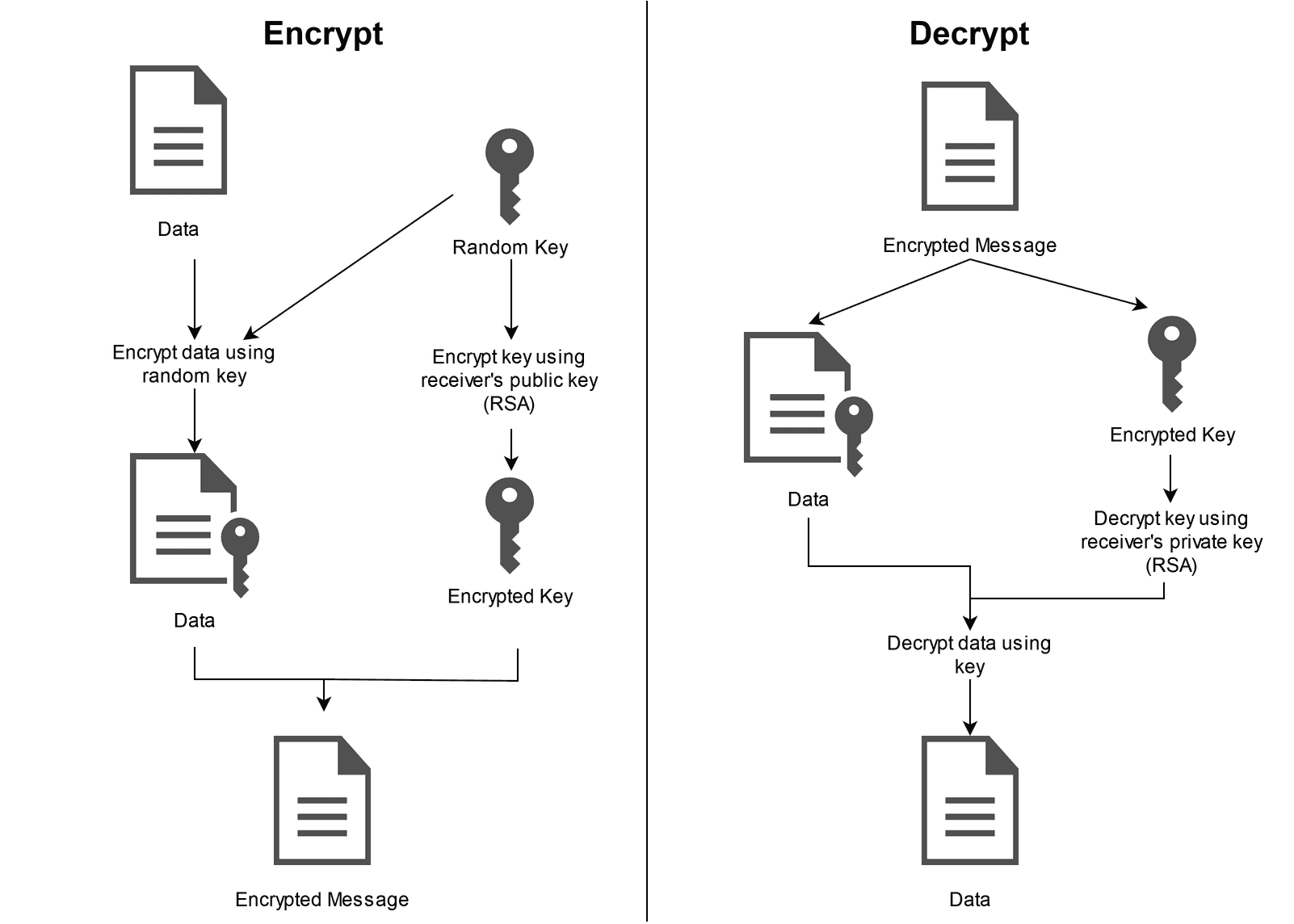
Hybrid Encryption: For bulk data, GPG generates a one-time symmetric session key, encrypts the payload with it (AES-256 or similar), then encrypts the session key with the recipient’s RSA/ECC public key. Only the session key wrapper changes between recipients — the ciphertext body remains the same — making multi-recipient encryption efficient without sacrificing security.
This hybrid model is why GPG can encrypt large files without the performance penalty of pure asymmetric operations, while still ensuring that only the intended recipient can recover the session key and access the content.
Practical Use Cases for GPG Link to heading
For engineers operating in environments where secrets, credentials, or sensitive configuration data need to move between systems or people, GPG offers several practical advantages:
- End-to-end confidentiality: Encrypted content is opaque to any intermediary — email servers, storage backends, or transit networks.
- Non-repudiation via signatures: A GPG-signed artefact can be cryptographically verified as originating from a specific key, which matters for software release pipelines, patch distribution, and configuration management.
- Integrity assurance: Any tampering with a signed file invalidates the signature, providing a tamper-evident seal without requiring a centralised PKI.
pass (password-store), signed Git commits, encrypted Ansible Vault alternatives, and secure configuration distribution. It’s not limited to email — any workflow involving sensitive data at rest or in transit can benefit.Generating a GPG Keypair Link to heading
sudo apt install gpg -y
gpg --full-generate-key
The --full-generate-key flag gives you control over key type, size, and expiry. For most use cases, RSA 4096-bit with a 2-year expiry is a reasonable default — long enough to be operationally convenient, short enough to limit exposure if the key is compromised without your knowledge.
After generating your keypair, list your private keys:
gpg --list-secret-keys --keyid-format=long
Example output:
/home/netadmin/.gpg/pubring.kbx
-------------------------------
sec 4096R/3AA5C34371567BD2 2016-03-10 [expires: 2025-04-19]
uid duke <ducmai.network@gmail.com>
ssb 4096R/4BB6D45482678BE3 2016-03-10
Manage Your GPG Keypair Link to heading
Backup Your GPG Keys Link to heading
Export public and private keys to armoured ASCII files:
gpg --export --armor <fingerprint> --output pubkey.asc
gpg --export-secret-keys --armor <fingerprint> --output privkey.asc
A fingerprint can be the long-form key ID or the associated email address (e.g., ducmai.network@gmail.com).
Archive and encrypt the private key before storing or transmitting it:
tar zcvf private-keys.tgz privkey.asc
openssl aes-256-cbc -salt -pbkdf2 -in private-keys.tgz -out private-keys.tgz.enc
private-keys.tgz.enc is safe to store in cloud storage or a shared repository — the AES-256-CBC encryption with a strong passphrase makes it opaque without the master password. The passphrase itself should be stored separately, ideally in a hardware-backed secret store or offline vault.Generate a revocation certificate immediately after creating a new keypair and store it offline separately from the private key. If you lose access to the private key without a revocation certificate, you cannot notify others that the key is no longer trustworthy.
gpg --gen-revoke <fingerprint> > revoke.asc
Restore the GPG Keys Link to heading
To restore from an encrypted backup:
wget -P private-keys.tgz.enc &&
openssl aes-256-cbc -salt -pbkdf2 -in "$HOME/.gpg/private-keys.tgz.enc" -out "$HOME/.gpg/private-keys.tgz" -d &&
tar zxvf "$HOME/.gpg/private-keys.tgz" -C "$HOME/.gpg" &&
rm "$HOME/.gpg/private-keys.tgz"
Import Your Keypairs Link to heading
gpg --import pubkey.asc
gpg --allow-secret-key-import --import privkey.asc
After importing, set the trust level on the private key:
gpg --edit-key <fingerprint>
Use trust inside the interactive session and select 5 (ultimate trust) for your own keys. Without this step, GPG will warn about untrusted keys on every operation, even for keys you generated yourself.
Encrypting and Decrypting with GPG Link to heading
Encrypt Messages with GPG Link to heading
gpg --armor --sign --encrypt --recipient <name> path/to/file
gpg -a -s -e -r <name> path/to/file
The --sign flag embeds your signature alongside the encryption, so the recipient can verify both that you encrypted it and that it hasn’t been modified. For files destined for multiple recipients, repeat --recipient for each one — GPG encrypts the session key separately for each, without re-encrypting the payload.
The output file will have the same name as the input file but with an .asc extension.
Decrypt Messages with GPG Link to heading
gpg --decrypt path/to/file.asc
gpg -d path/to/file.asc
GPG will prompt for your passphrase, decrypt the session key using your private key, then use the session key to decrypt the payload. If the file was signed, GPG will also print signature verification output — pay attention to this output in automated pipelines to catch tampered files early.
Import Another User’s GPG Key Link to heading
To retrieve a key from a public keyserver:
gpg --recv-keys <keyID>
Or search by name or email:
gpg --search-keys <name>