Table of Contents Link to heading
- Why Printer Sharing Looks Simple and Isn’t
- The Setup: USB Printer Shared to Mixed-OS Clients
- Failure Modes in Practice: Driver, Auth, and Connectivity Issues
- SMB Vulnerabilities: Why Microsoft Is Closing the Door on Shared Printing
- The Troubleshooting Cycle: Temporary Fixes That Don’t Stay Fixed
- Recommendation: Invest in Network Printers ASAP
- Stop Treating Printer Sharing as a Long-Term Solution
Why Printer Sharing Looks Simple and Isn’t Link to heading
Shared printing via Windows Share is the kind of solution that looks reasonable in a pinch and becomes a recurring nightmare in practice. IT teams inherit these setups constantly — they work just well enough to avoid being prioritised for replacement, yet generate a disproportionate share of helpdesk tickets, usually at the worst possible times.
The Setup: USB Printer Shared to Mixed-OS Clients Link to heading
In theory:
- Enable “Share this printer” on the host machine
- On the client, navigate to
\\AccountingPCand install the printer
In practice, that’s where the straightforward part ends.
Failure Modes in Practice: Driver, Auth, and Connectivity Issues Link to heading
The gap between the theory and the reality of Windows printer sharing is significant:
- Driver architecture mismatch: 32-bit and 64-bit driver packages are not interchangeable. Windows 11 (64-bit) clients attempting to install a driver from a Windows 7 (32-bit) host will frequently fail silently or with cryptic error codes.
- Windows 11 driver signing enforcement: Modern Windows blocks unsigned or untrusted drivers at the kernel level. Manual driver installation attempts are often rejected outright.
- Authentication friction in workgroup environments: Without a domain controller providing Kerberos authentication, clients must authenticate to the sharing host using local credentials — an operational overhead that scales poorly and is frequently misconfigured.
- Domain vs. workgroup boundaries: Environments without Active Directory lack centralised access control for printer sharing, forcing per-machine management.
- Opaque connection errors:
Cannot connect to printer,No driver found, and phantom visibility issues are symptoms, not root causes — diagnosing them requires tracing through the Windows Print Spooler service, driver store, and network path simultaneously.
Case Study: The Accounting Team’s Shared Printer Disaster Link to heading
The accounting team’s PC is the single point of dependency for the office’s shared printer. After a routine Windows Update:
- The Print Spooler configuration changes, breaking the shared printer export
- All other users lose print access; the accounting team is unaffected and unaware
- IT spends hours reinstalling drivers, restarting spooler services, and retracing network share permissions — only to have the same issue recur with the next patch cycle
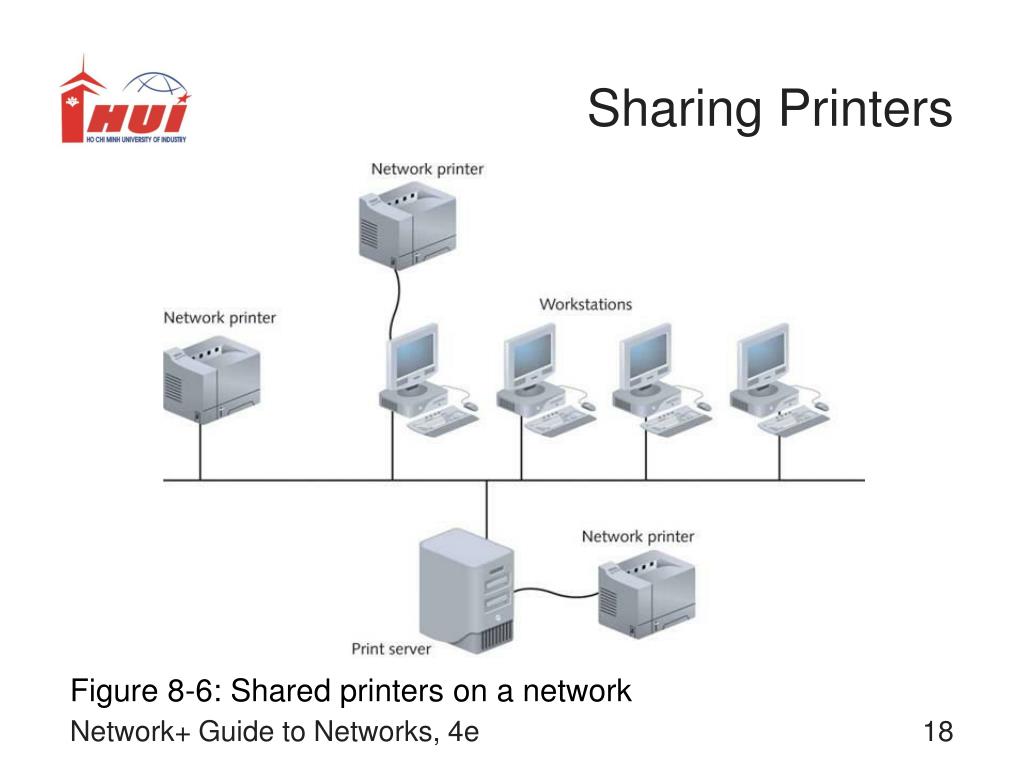
A network printer with a static IP eliminates the host dependency entirely. The printer is always reachable by any device on the network, regardless of the state of any individual workstation.
SMB Vulnerabilities: Why Microsoft Is Closing the Door on Shared Printing Link to heading
Microsoft has been systematically hardening or disabling SMBv1 and legacy print spooler behaviour since Windows 10 20H2, driven by a series of high-severity vulnerabilities:
- PrintNightmare (CVE-2021-34527): A remote code execution vulnerability in the Windows Print Spooler that allowed privilege escalation to SYSTEM from a standard user account. The attack surface was the shared printer pathway.
- SMB lateral movement in ransomware: A substantial proportion of ransomware incidents involving SMB-based lateral movement exploited the print spooler or SMB file share configurations that organisations had enabled specifically to support legacy printer sharing.
Microsoft’s response — disabling remote spooler functions and blocking unsigned drivers — is correct from a security posture perspective. But it directly breaks legacy printer sharing setups that organisations have been running for years without incident.
Case Study: Security Nightmare in a SMB Environment Link to heading
An organisation running SMB-based shared printers in a workgroup configuration:
- Ransomware propagates via SMB, leveraging the open file and print sharing paths as lateral movement channels
- Microsoft patches that address the vulnerability disable remote spooler functions — breaking print access for all connected users
- Under operational pressure, IT re-enables the vulnerable configuration to restore printing, creating a security regression that the next patch will reclose
The Troubleshooting Cycle: Temporary Fixes That Don’t Stay Fixed Link to heading
The standard troubleshooting sequence for broken Windows printer sharing:
- Source and install 64-bit drivers manually from the manufacturer’s site
- Add the printer as a local port using the UNC path (
\\host\printer) rather than the standard shared printer discovery path - Configure via TCP/IP port if the printer can be reached directly (bypassing the sharing host)
- Clear the print spool directory, restart the Print Spooler service, and test
When it finally works after an hour of troubleshooting, the relief is real. But this is maintenance work — not value-added work — and it will be needed again.
Case Study: The Cross-Architecture Driver Struggle Link to heading
Windows 7 (32-bit) shares a USB printer to Windows 10/11 (64-bit) clients. After a Windows Update:
- Windows blocks the driver already installed on client machines due to updated signing requirements
- The 32-bit driver package from the sharing host cannot be installed on 64-bit clients
- The manufacturer’s 64-bit driver, installed manually, is rejected because Windows cannot associate it with the shared queue path
A network printer provides its own driver endpoint and manages connections independently of the host OS. Architecture mismatches between clients and driver stores become irrelevant.
Recommendation: Invest in Network Printers ASAP Link to heading
For any IT manager, department head, or system administrator still running Windows printer sharing: the operational calculus has shifted. The security landscape makes legacy SMB sharing increasingly untenable, and the maintenance overhead compounds with every OS update cycle.
Advantages of Network Printers Link to heading
- Eliminates host dependency — the printer is accessible regardless of the state of any workstation
- Dedicated IP and DNS entry — consistent, addressable, manageable
- Driver architecture independence — clients connect directly to the printer’s own driver interface, bypassing the host OS layer entirely
- Reduced SMB attack surface — no shared spooler path, no SMB print share to protect or patch
- Centralised management — web UI or manufacturer management software provides queue visibility, firmware updates, and configuration from a single pane
What About Costs? Link to heading
The price delta between a USB-only printer and a network-capable equivalent from the same manufacturer has narrowed considerably. Network-capable models from HP, Canon, and Brother typically cost $12–40 more than their USB-only counterparts. USB-to-LAN print servers for existing USB printers are available in the $40–80 range.
Set against even a single helpdesk incident requiring a senior engineer’s time, the cost difference pays for itself in the first year.
Stop Treating Printer Sharing as a Long-Term Solution Link to heading
Printer sharing is a visible symptom of a broader pattern: infrastructure decisions made under time pressure that are never revisited until they cause an incident. The configuration works for a while, accumulates fragility with every OS update, and eventually fails at the worst possible moment.
Network printers are not a luxury — they are the correct solution to a well-understood problem. The investment is modest. The operational return is substantial. The security case is compelling.
Replacing Windows printer sharing with networked print infrastructure is one of the highest-return, lowest-risk IT investments available to most organisations. The question is not whether to do it — it’s why it hasn’t been done already.