Table of Contents Link to heading
- What CoPP Does and Why It Matters
- Control Plane Traffic Categories
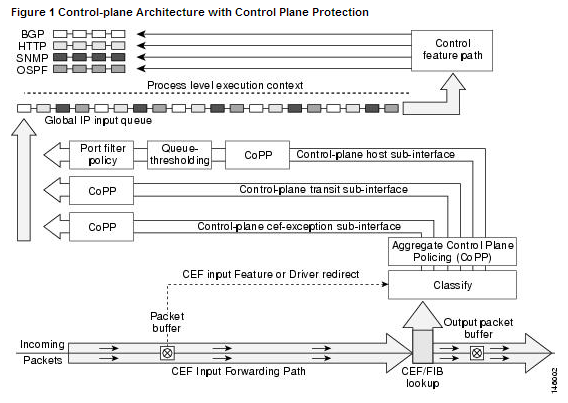
- CoPP Architecture: Three Planes
- Configuration
What CoPP Does and Why It Matters Link to heading
Without CoPP, any traffic addressed to the router — legitimate or otherwise — competes equally for CPU cycles. A single misconfigured device flooding ARP requests, a DoS attack targeting the management plane, or a routing protocol storm can saturate the RP and cause:
- Routing adjacency drops (OSPF, BGP, EIGRP hello timeouts)
- SSH and SNMP becoming unresponsive
- Forwarding table updates stalling
- Complete control-plane failure while the data plane continues forwarding stale entries
CoPP applies a QoS service-policy to the control plane interface, enforcing rate limits per traffic class before packets reach the CPU. Transit traffic — packets routed through the device — is not affected.
Control Plane Traffic Categories Link to heading
| Class | Examples | Priority |
|---|---|---|
| Routing | OSPF hellos, EIGRP updates, BGP keepalives | High — must not be dropped |
| Management | SSH, SNMP, NETCONF, syslog | Medium |
| ICMP | Ping, traceroute | Low-medium |
| ARP | ARP requests/replies | Medium |
| DHCP | DHCP discover/offer/request/ACK | Medium |
| Undesirable | Fragments, TTL-expired packets, spoofed traffic | Drop or strict rate-limit |
| Default | Everything not matched by other classes | Best-effort or drop |
CoPP Architecture: Three Planes Link to heading
Understanding which plane traffic belongs to is essential for correct CoPP design:
| Plane | Function | CoPP Relevance |
|---|---|---|
| Data plane | Forwarding packets between interfaces (hardware) | Not affected by CoPP |
| Control plane | Running routing protocols, building tables (CPU) | CoPP protects this |
| Management plane | SSH, SNMP, console access (CPU) | CoPP can rate-limit or permit |
Configuration Link to heading
Traffic Classification Link to heading
CoPP uses the standard MQC framework: classify with ACLs and class-maps, then apply policy.
Step 1 — Define ACLs to match traffic:
ip access-list extended COPP-OSPF
 permit ospf any any

ip access-list extended COPP-BGP
 permit tcp any any eq 179
 permit tcp any eq 179 any

ip access-list extended COPP-SSH
 permit tcp any any eq 22

ip access-list extended COPP-ICMP
 permit icmp any any

ip access-list extended COPP-SNMP
 permit udp any any eq 161
Step 2 — Define class-maps:
class-map match-all CMAP-OSPF
 match access-group name COPP-OSPF

class-map match-all CMAP-BGP
 match access-group name COPP-BGP

class-map match-all CMAP-SSH
 match access-group name COPP-SSH

class-map match-all CMAP-ICMP
 match access-group name COPP-ICMP

class-map match-all CMAP-SNMP
 match access-group name COPP-SNMP
Traffic Treatment (Policy Map) Link to heading
Step 3 — Define the policy map with per-class rate limits:
policy-map PMAP-COPP
 class CMAP-OSPF
  police 256000 conform-action transmit exceed-action transmit
 class CMAP-BGP
  police 256000 conform-action transmit exceed-action transmit
 class CMAP-SSH
  police 64000 conform-action transmit exceed-action drop
 class CMAP-SNMP
  police 64000 conform-action transmit exceed-action drop
 class CMAP-ICMP
  police 32000 conform-action transmit exceed-action drop
 class class-default
  police 32000 conform-action transmit exceed-action drop
exceed-action transmit initially during tuning — this lets you see how much traffic is exceeding thresholds (via show policy-map control-plane) without actually dropping legitimate routing updates. Once you’ve baselined normal traffic rates, switch to exceed-action drop.Apply Policy to the Control Plane Link to heading
Step 4 — Apply to the control plane:
control-plane
 service-policy input PMAP-COPP
Production Multi-Class Template Link to heading
A complete CoPP template for a production router with OSPF, BGP, SSH management, and SNMP monitoring:
! ACLs
ip access-list extended COPP-ROUTING
 permit ospf any any
 permit eigrp any any
 permit tcp any any eq 179
 permit tcp any eq 179 any

ip access-list extended COPP-MGMT
 permit tcp 10.0.0.0 0.0.255.255 any eq 22
 permit udp 10.0.0.0 0.0.255.255 any eq 161

ip access-list extended COPP-ICMP
 permit icmp any any echo
 permit icmp any any echo-reply
 permit icmp any any ttl-exceeded
 permit icmp any any port-unreachable

! Class Maps
class-map match-all CMAP-ROUTING
 match access-group name COPP-ROUTING
class-map match-all CMAP-MGMT
 match access-group name COPP-MGMT
class-map match-all CMAP-ICMP
 match access-group name COPP-ICMP

! Policy Map
policy-map PMAP-COPP
 class CMAP-ROUTING
  police 512000 conform-action transmit exceed-action transmit
 class CMAP-MGMT
  police 128000 conform-action transmit exceed-action drop
 class CMAP-ICMP
  police 64000 conform-action transmit exceed-action drop
 class class-default
  police 32000 conform-action transmit exceed-action drop

! Apply
control-plane
 service-policy input PMAP-COPP
Verification Link to heading
show policy-map control-plane
show access-lists
show class-map
show policy-map control-plane is the primary verification command. It shows packet counts in the conform and exceed buckets per class, allowing you to identify which traffic types are hitting their rate limits and tune thresholds accordingly. A consistently non-zero exceed count on the OSPF or BGP class is a signal that the rate limit may be too low for the environment.