Table of Contents Link to heading
- Network Latency and Why QoS Exists
- QoS Service Models
- Modular QoS CLI (MQC)
- Classification
- Marking
- Policing vs Shaping
- Congestion Management: Queuing Mechanisms
- Congestion Avoidance: Tail Drop and WRED
Network Latency and Why QoS Exists Link to heading
Sources of network latency:
| Type | Description | Controllable? |
|---|---|---|
| Propagation delay | Speed-of-light travel time across the physical medium | No |
| Serialisation delay | Time to place all bits of a packet onto the wire | No |
| Processing delay | Time for the device to move the packet from input queue to output queue | Minimal |
| Queuing delay | Time a packet waits in a queue before being transmitted | Yes — QoS controls this |
| Jitter | Variation in queuing delay between successive packets of the same flow | Yes — QoS reduces this |
Industry recommendations:
- Total one-way latency: ≤ 150 ms for real-time traffic (voice/video)
- Jitter: ≤ 30 ms for VoIP
- Packet loss: ≤ 1% for voice, ≤ 0.1% for video conferencing
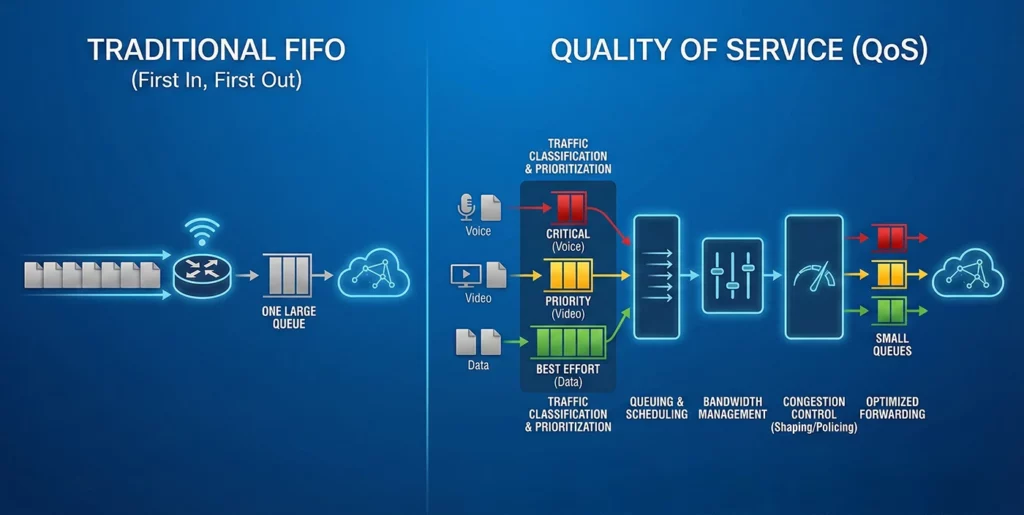
QoS cannot reduce propagation delay — but it can minimise queuing delay for latency-sensitive traffic by ensuring it is served first.
QoS Service Models Link to heading
Best Effort Link to heading
No QoS applied. All packets compete equally for bandwidth. Acceptable for email, web browsing, and bulk file transfer — not for voice or real-time video.
Integrated Services (IntServ) Link to heading
- Applications explicitly request bandwidth from the network before transmitting
- RSVP signals the reservation through every hop on the path
- Every router must maintain per-flow state — does not scale beyond small networks
- Provides the strongest QoS guarantees but is operationally complex and impractical at scale
Differentiated Services (DiffServ) Link to heading
DiffServ is the operational model used in enterprise and service provider networks. No per-flow state is maintained — each router applies its locally configured policy based on the packet marking. This scales to any network size.
Modular QoS CLI (MQC) Link to heading
MQC is the three-step Cisco framework for QoS configuration:
1. class-map     → Identify what traffic to act on
2. policy-map    → Define what to do with it
3. service-policy→ Apply the policy to an interface
class-map: Classifying Traffic Link to heading
class-map match-all VOIP-RTP
 match dscp ef

class-map match-any P2P
 match protocol bittorrent
 match protocol kazaa2
match-all requires all match criteria to be true (AND logic). match-any requires at least one (OR logic).
Common match methods:
| Match Type | Example |
|---|---|
| DSCP | match dscp ef |
| ACL | match access-group 101 |
| Protocol (NBAR) | match protocol http |
| CoS | match cos 5 |
| VLAN | match vlan 10 |
All unmatched traffic falls into class-default, which is always present and cannot be deleted.
ip access-list extended VOICE-TRAFFIC
 permit udp any any range 16384 32767

class-map match-all VOIP-TELEPHONY
 match access-group name VOICE-TRAFFIC
 match dscp ef

class-map match-any P2P
 match protocol bittorrent
 match protocol soulseek
policy-map: Defining Per-Class Actions Link to heading
policy-map ENTERPRISE-QOS
 class VOIP-TELEPHONY
  priority percent 30
 class VIDEO-CONF
  bandwidth percent 20
 class P2P
  police 5000000 conform-action transmit exceed-action drop
 class class-default
  fair-queue
Common policy-map actions:
| Action | Purpose |
|---|---|
priority |
LLQ — strict priority for latency-sensitive traffic |
bandwidth |
CBWFQ — guaranteed minimum bandwidth under congestion |
police |
Rate-limit — drop or remark excess traffic |
shape |
Buffer and delay excess traffic (WAN egress) |
set dscp |
Remark DSCP value |
fair-queue |
WFQ for unclassified traffic |
service-policy: Applying to an Interface Link to heading
interface GigabitEthernet0/1
 service-policy output ENTERPRISE-QOS
QoS queuing policies are typically applied outbound — congestion occurs at the egress queue when output bandwidth is less than input. Inbound policies (policing/marking) are applied on the ingress direction.
Core MQC Actions Link to heading
LLQ (Low Latency Queue) — for voice and real-time traffic:
class VOICE
 priority percent 30
The priority command creates a strict priority queue. Traffic in this class is always served before any other class during congestion. The percentage cap prevents starvation of other classes — if voice traffic exceeds the configured percentage, excess is policed (dropped), not queued.
CBWFQ (Class-Based WFQ) — for data with bandwidth guarantees:
class DATA
 bandwidth percent 40
Guarantees minimum bandwidth during congestion. If the link is not congested, the class can use more than its guaranteed share.
Policing — rate-limit with drop:
class BULK
 police 10000000 conform-action transmit exceed-action drop
Shaping — buffer and smooth:
policy-map SHAPE-WAN
 class class-default
  shape average 10000000
Verification:
show policy-map interface GigabitEthernet0/1
show class-map
show policy-map
Classification Link to heading
Classification identifies which traffic class a packet belongs to. It should occur as close to the traffic source as possible — ideally at the access layer where the traffic enters the network.
Classification methods by OSI layer:
| Layer | Descriptor |
|---|---|
| Layer 1 | Physical interface or port |
| Layer 2 | MAC address, 802.1Q CoS bits |
| Layer 2.5 | MPLS EXP bits |
| Layer 3 | DSCP, IP Precedence, source/destination IP |
| Layer 4 | TCP/UDP port numbers |
| Layer 7 | NBAR2 application recognition (protocol-aware classification) |
Marking Link to heading
Marking writes a QoS value into the packet or frame header so downstream devices can apply consistent policy without re-classifying traffic.
Layer 2 Marking: Class of Service (CoS) Link to heading
CoS is a 3-bit field (PCP — Priority Code Point) in the 802.1Q VLAN tag header. It provides 8 priority levels (0–7):
| PCP Value | Traffic Type |
|---|---|
| 0 | Background (lowest) |
| 1 | Best effort (default) |
| 2 | Excellent effort |
| 3 | Critical applications |
| 4 | Video (< 100 ms latency) |
| 5 | Voice (< 10 ms latency) |
| 6 | Internetwork control |
| 7 | Network control (highest) |
Limitation: CoS markings are lost when a frame traverses a non-802.1Q link or is routed at Layer 3. Use DSCP for end-to-end marking.
Layer 3 Marking: IP Precedence and DSCP Link to heading
Layer 3 marking uses the DS field (formerly ToS) in the IPv4 header. This marking is preserved across Layer 3 boundaries, making it the standard for end-to-end QoS.
IP Precedence (IPP) Link to heading
A 3-bit field providing 8 priority levels. Legacy — superseded by DSCP.
DSCP and Per-Hop Behaviours (PHB) Link to heading
DSCP is a 6-bit field providing 64 possible values. Routers apply a Per-Hop Behaviour (PHB) at each hop based on the DSCP value.
Class Selector (CS) — backward-compatible with IP Precedence:
| CS | DSCP Decimal | Legacy Mapping |
|---|---|---|
| CS0 | 0 | Best effort |
| CS1 | 8 | Low priority |
| CS2 | 16 | Standard |
| CS3 | 24 | Signalling |
| CS4 | 32 | Video |
| CS5 | 40 | Voice signalling |
| CS6 | 48 | Network control |
| CS7 | 56 | Routing protocol |
Expedited Forwarding (EF) — DSCP 46:
- Strict priority queue, minimal delay and jitter
- Used for VoIP RTP streams
- Routers forward EF traffic before all other classes
Assured Forwarding (AF) — four classes, three drop precedences each:
AFxy:  x = class (1–4, higher = more important)
       y = drop precedence (1–3, lower = less likely to drop)
DSCP = 8x + 2y
| AF | DSCP Decimal | Binary | Use Case |
|---|---|---|---|
| AF11 | 10 | 001010 | Low-priority data |
| AF21 | 18 | 010010 | Standard data |
| AF31 | 26 | 011010 | Business-critical data |
| AF41 | 34 | 100010 | Video streaming |
| AF43 | 38 | 100110 | Video (high drop prob) |
Trust Boundary Link to heading
The trust boundary is the network point beyond which DSCP markings from external sources are accepted without re-marking.
- Trust IP phones: accept DSCP EF markings from the phone
- Do not trust PCs: remark PC traffic to CS0 (best effort) at the access port — PCs can self-mark to any DSCP value, which would bypass QoS policy
! Trust IP phone on access port
interface GigabitEthernet0/1
 mls qos trust device cisco-phone
 mls qos trust cos

! Do not trust PC — remark all CoS to 0
interface GigabitEthernet0/2
 mls qos cos override
Policing vs Shaping Link to heading
| Feature | Policing | Shaping |
|---|---|---|
| Mechanism | Drop or remark excess traffic immediately | Buffer excess traffic and transmit later |
| Direction | Ingress and egress | Egress only |
| Packet loss | Yes — excess packets are dropped | No — excess packets are queued |
| Delay | No additional delay | Adds delay (buffering) |
| Use case | Enforcing customer rate limits at service edge | Smoothing WAN egress to match circuit speed |
| TCP behaviour | TCP detects drops and backs off | TCP sees no drops, but experiences delay |
Congestion Management: Queuing Mechanisms Link to heading
| Mechanism | Description | Use Case |
|---|---|---|
| FIFO | Single queue, first in first out, no classification | Default, no QoS |
| Round Robin (RR) | Multiple queues, one packet per queue per round | Equal treatment |
| Weighted Round Robin (WRR) | Like RR but higher-weight queues get more turns | Differentiated treatment |
| WFQ (Weighted Fair Queuing) | Auto-classifies flows, small/interactive flows get preference | Low-speed legacy links |
| Priority Queuing (PQ) | Strict priority, high queue always served first | Can cause starvation |
| CBWFQ | User-defined classes with guaranteed minimum bandwidth | Enterprise standard |
| LLQ | CBWFQ + one strict priority queue | Voice + data in same policy |
priority percent for the voice class (EF) and bandwidth percent for remaining classes. Always ensure class-default receives some bandwidth so even unclassified traffic is not completely starved.Congestion Avoidance: Tail Drop and WRED Link to heading
Tail Drop (default):
- Drops packets only when the queue is completely full
- All flows experience loss simultaneously → TCP global synchronisation: all TCP flows reduce their window simultaneously, then recover together, causing sawtooth traffic patterns
- Reactive — too late to prevent queue saturation
RED (Random Early Detection):
- Begins probabilistically dropping packets before the queue fills
- Drop probability increases as queue depth increases
- Breaks up TCP global synchronisation by affecting different flows at different times
- Not DSCP-aware — treats all traffic the same
WRED (Weighted RED):
- RED + DSCP awareness
- Higher-priority traffic (lower DSCP drop probability) is dropped later
- Lower-priority traffic is dropped earlier, protecting critical traffic
- Configured within CBWFQ/LLQ policies
policy-map WRED-POLICY
 class DATA
  bandwidth percent 40
  random-detect dscp-based