Table of Contents Link to heading
- What SD-WAN Solves
- SD-WAN Architecture: Four Planes, Four Components
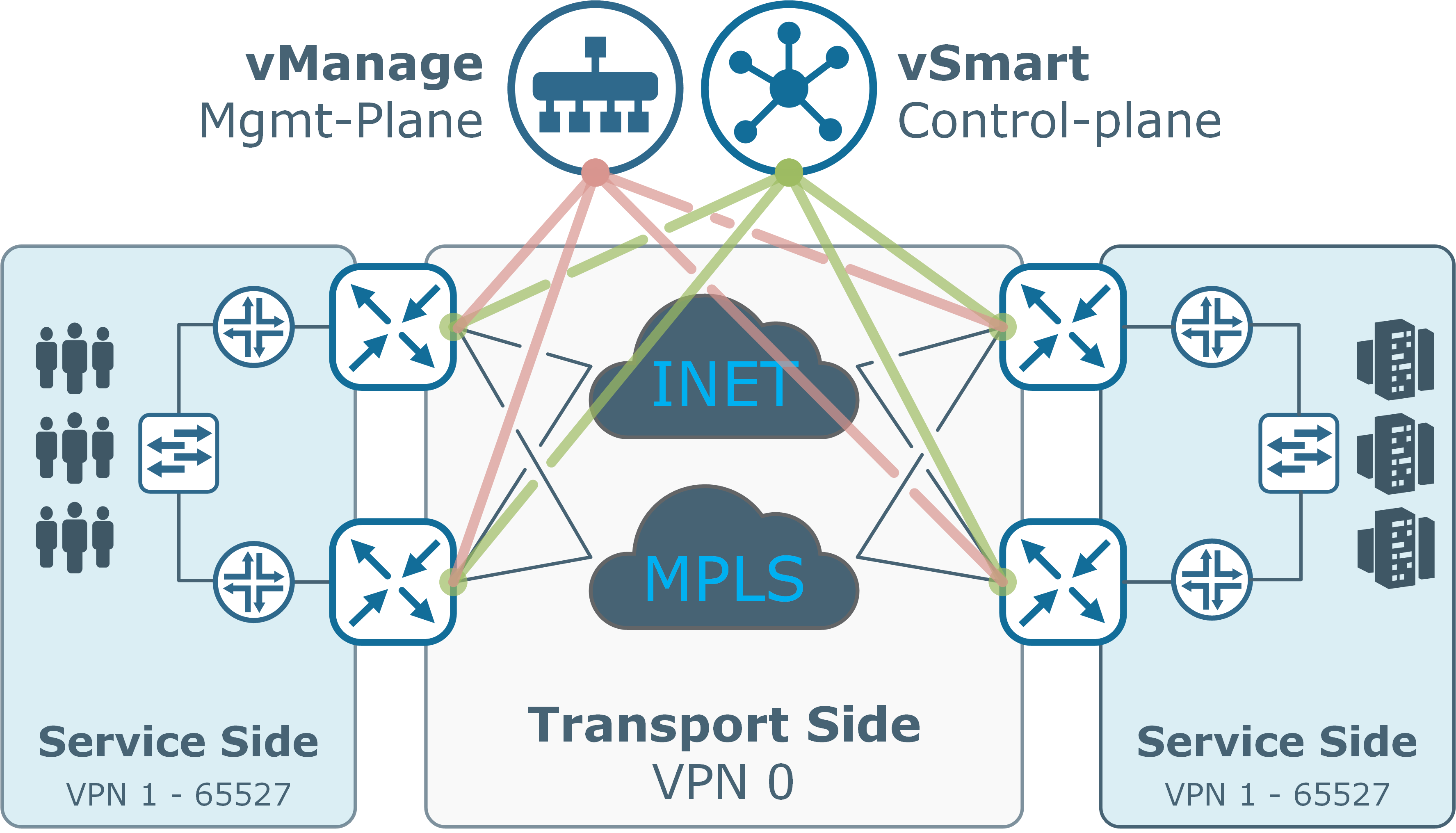
- vManage: Management and Configuration Plane
- vBond: Orchestration and NAT Traversal
- vSmart: Control Plane and Policy Distribution
- Edge Routers (vEdge / cEdge)
- vAnalytics: Advanced WAN Analytics
- SD-WAN Tunnel Architecture and Security
What SD-WAN Solves Link to heading
Traditional WAN architectures route all branch traffic back to a hub site (data centre) before forwarding it to the internet or cloud — a model called backhauling. This was acceptable when all applications lived in the data centre. With the majority of enterprise traffic now destined for cloud services (SaaS, IaaS), backhauling adds latency and wastes expensive MPLS capacity.
SD-WAN enables:
- Direct internet breakout at branch sites for cloud-destined traffic
- Application-aware routing — select the best available transport path per application based on real-time performance metrics
- Zero-touch provisioning — edge devices authenticate and configure themselves on first boot
- Centralised policy — define routing, QoS, and security policy once in vManage, distribute to all edges automatically
SD-WAN Architecture: Four Planes, Four Components Link to heading
| Plane | Component | Role |
|---|---|---|
| Management plane | vManage | Single pane of glass — GUI, API, templates, monitoring |
| Orchestration | vBond | Device authentication, controller discovery, NAT traversal |
| Control plane | vSmart | Routing policy, OMP, distributes routes and policies to edges |
| Data plane | Edge routers (vEdge/cEdge) | Forward traffic, apply policies, build IPsec tunnels |
All control connections use DTLS (Datagram Transport Layer Security) tunnels — encrypted, UDP-based connections that traverse NAT and firewalls.
vManage: Management and Configuration Plane Link to heading
vManage functions:
- Device templates: Define configuration using feature templates (interface, OSPF, BGP, QoS, security) and device templates that compose feature templates per device type
- Policy management: Create centralised policies (routing, QoS, security, application-aware routing) that are pushed to vSmart for distribution
- Real-time monitoring: Interface utilisation, tunnel status, application experience, and alarm management
- Software management: Manage IOS XE software images across the entire edge fleet from a single dashboard
- Zero-touch provisioning: Registers new edge devices automatically on first boot using the vBond address pre-configured in the device
vBond: Orchestration and NAT Traversal Link to heading
vBond must be publicly reachable because it is the first contact point for edge devices that sit behind NAT. Its IP address is pre-configured on every edge router (via the device template or manually) before deployment.
Authentication and Device Onboarding Link to heading
The authentication sequence:
- Edge router boots and contacts vBond using the pre-configured vBond address
- vBond validates the device’s certificate (from the Cisco PKI or an enterprise PKI)
- vBond provides the edge router with the addresses of all vSmart controllers and vManage
- Edge router establishes DTLS connections to vSmart (OMP peering) and vManage (management)
- Edge router downloads its configuration from vManage and begins forwarding
Load Balancing Link to heading
When multiple vSmart controllers or vManage instances are deployed (for redundancy and scale), vBond distributes session establishment across available instances — acting as a load balancer for the control plane.
NAT Traversal (NAT-T) Link to heading
- Problem: Branch edge routers typically sit behind NAT. Their real IP address is hidden from the fabric — the controller only sees the NAT-translated public address. Standard IPsec cannot traverse NAT when the VPN headers are written before NAT translation occurs.
- Solution: vBond acts as a STUN server (Session Traversal Utilities for NAT). When an edge device contacts vBond, vBond reflects back the device’s public IP address and source port as seen from the internet.
- Result: The edge device learns its own NAT-translated address and uses it to advertise reachability to other fabric members, enabling direct data-plane IPsec tunnel establishment even across NAT boundaries.
vSmart: Control Plane and Policy Distribution Link to heading
Overlay Management Protocol (OMP) Link to heading
OMP runs over DTLS tunnels between vSmart and each edge router. OMP routes contain:
- Service routes: Prefixes reachable behind each edge router (LAN-side networks)
- Transport locators (TLOCs): The WAN IP addresses of each edge router, colour-coded by transport type (mpls, biz-internet, lte)
- Policy attributes: Route preferences, community-like tags used for policy matching
vSmart processes OMP routes received from all edges, applies centralised routing policies, and re-advertises selected routes back to edges — controlling which paths each edge uses to reach which destinations.
Control Plane Policies Link to heading
Policy creation and distribution flow:
- Operator creates a policy in vManage (application-aware routing, QoS, data policy)
- vManage pushes the policy to vSmart via the NETCONF API
- vSmart converts the policy into per-edge forwarding instructions
- vSmart distributes instructions to applicable edge routers via OMP
This centralised model means policy changes are made once and propagated automatically — no per-device configuration changes required.
Edge Routers (vEdge / cEdge) Link to heading
Each edge router automatically establishes:
- DTLS control connections to all vSmart controllers → forms OMP adjacencies to exchange routes and receive policies
- IPsec data-plane tunnels to all other edge routers in the fabric → provides the actual encrypted transport for site-to-site traffic
Platform variants:
- vEdge: Legacy Viptela hardware platform running Viptela OS
- cEdge: Cisco IOS XE platforms (ISR 1000/4000, ASR 1000, CSR 1000v, Catalyst 8000) running IOS XE with the SD-WAN software feature set — the current standard for new deployments
Edge routers make site-local forwarding decisions only — they do not run distributed routing protocols between themselves. All remote-site route learning comes from vSmart via OMP.
vAnalytics: Advanced WAN Analytics Link to heading
vAnalytics capabilities:
- Application and infrastructure visibility: Per-application bandwidth, latency, and loss across all WAN transports
- Capacity forecasting: Trend analysis and what-if modelling for bandwidth planning
- Intelligent recommendations: Identify underutilised circuits, suboptimal routing, and policy tuning opportunities
vAnalytics is separate from the vManage monitoring dashboard — it provides longer-term trending and predictive analytics rather than real-time operational visibility.
SD-WAN Tunnel Architecture and Security Link to heading
All SD-WAN data-plane traffic flows through IPsec tunnels established directly between edge routers (not via vSmart):
| Tunnel type | Between | Protocol | Purpose |
|---|---|---|---|
| Control DTLS | Edge ↔ vSmart | DTLS/UDP | OMP routing and policy exchange |
| Control DTLS | Edge ↔ vManage | DTLS/UDP | Management and configuration |
| Data IPsec | Edge ↔ Edge | IPsec/UDP | Encrypted site-to-site traffic |