Table of Contents Link to heading
- What Is a Database
- Database Management System (DBMS)
- A Concrete Example: The Library Analogy
- Why Store Data at All?
- SQL: The Language of Structured Data
- What a DBMS Actually Does
- DBMS Internal Architecture
What Is a Database Link to heading
A database is an organised collection of tables containing data, designed to support the storage, retrieval, and management of information about real-world or conceptual objects and their relationships.
- Objects/Entities: Person, Item, Staff, Product — things the database tracks
- Relationships: “Henry purchased an apple” — how entities interact
- Real-world objects: Book, Student — tangible things (physical existence)
- Conceptual objects: Course, Film, Sale — intangible things (no physical form, but meaningful to the business)
The distinction between real-world and conceptual objects matters during database design: both types become entities in the model, but conceptual entities are often the result of relationships between real-world ones.
Database Management System (DBMS) Link to heading
A DBMS is software that stores and manages one or more databases. It acts as an intermediary between the raw data on disk and the applications or users that need to access it.
A DBMS provides four core guarantees:
| Guarantee | Meaning |
|---|---|
| Persistence | Data written to the database survives after the session ends and can be retrieved later |
| Reliability | Data can be recovered after hardware or software failures (via logging and recovery) |
| Integrity | Data must satisfy defined constraints (e.g., a student mark must be between 0 and 100) |
| Privacy | Access to data is controlled — different users see different parts of the database |
A DBMS also handles concurrency — multiple applications and users can read and write data simultaneously without corrupting each other’s work.
Popular open-source DBMS options include SQLite, MySQL, PostgreSQL, and MS-SQL Express. Commercial options include Oracle, IBM DB2, and Microsoft SQL Server.
A Concrete Example: The Library Analogy Link to heading
A library is a useful mental model for understanding the DBMS:
- Books = objects containing data
- Catalogue system = the DBMS — it knows where everything is, controls who can access what, and manages concurrent requests
Just as a library catalogue lets you search, reserve, and track books without touching the physical shelves, a DBMS lets applications query and modify data without understanding how it is stored on disk.
Why Store Data at All? Link to heading
It is often noted that 90% of business data is rarely accessed after it is created. The justification for storing it anyway falls into two categories:
- Compliance — laws and company regulations require data to be retained for defined periods, regardless of how often it is accessed
- Data mining — even infrequently accessed data may contain patterns, correlations, or anomalies that become valuable when analysed in aggregate
Stored data enables two operational modes:
- Historical analysis — what happened, when, and why
- Predictive modelling — what is likely to happen based on past patterns
SQL: The Language of Structured Data Link to heading
Structured Query Language (SQL) is the standard language for interacting with relational databases. It is a fourth-generation language (4GL) — a high-level, declarative language where you specify what you want rather than how to retrieve it.
SELECT studentName, gpa
FROM Student
WHERE gpa > 3.5
ORDER BY gpa DESC;
The DBMS interprets the SQL statement, determines the most efficient way to retrieve the result, executes it against the data, and returns the answer. The application never needs to know whether the data is stored on one disk or a hundred.
What a DBMS Actually Does Link to heading
A DBMS performs the following functions:
- Data exchange — translates between the application’s requests and the physical data on disk
- Disk space management — allocates and reclaims storage as data grows and shrinks
- Schema management — creates, modifies, and removes tables and indexes
- Data manipulation — handles INSERT, UPDATE, DELETE operations including constraint enforcement
- Query optimisation — parses SQL, generates and selects an execution plan, and returns results efficiently
DBMS Internal Architecture Link to heading
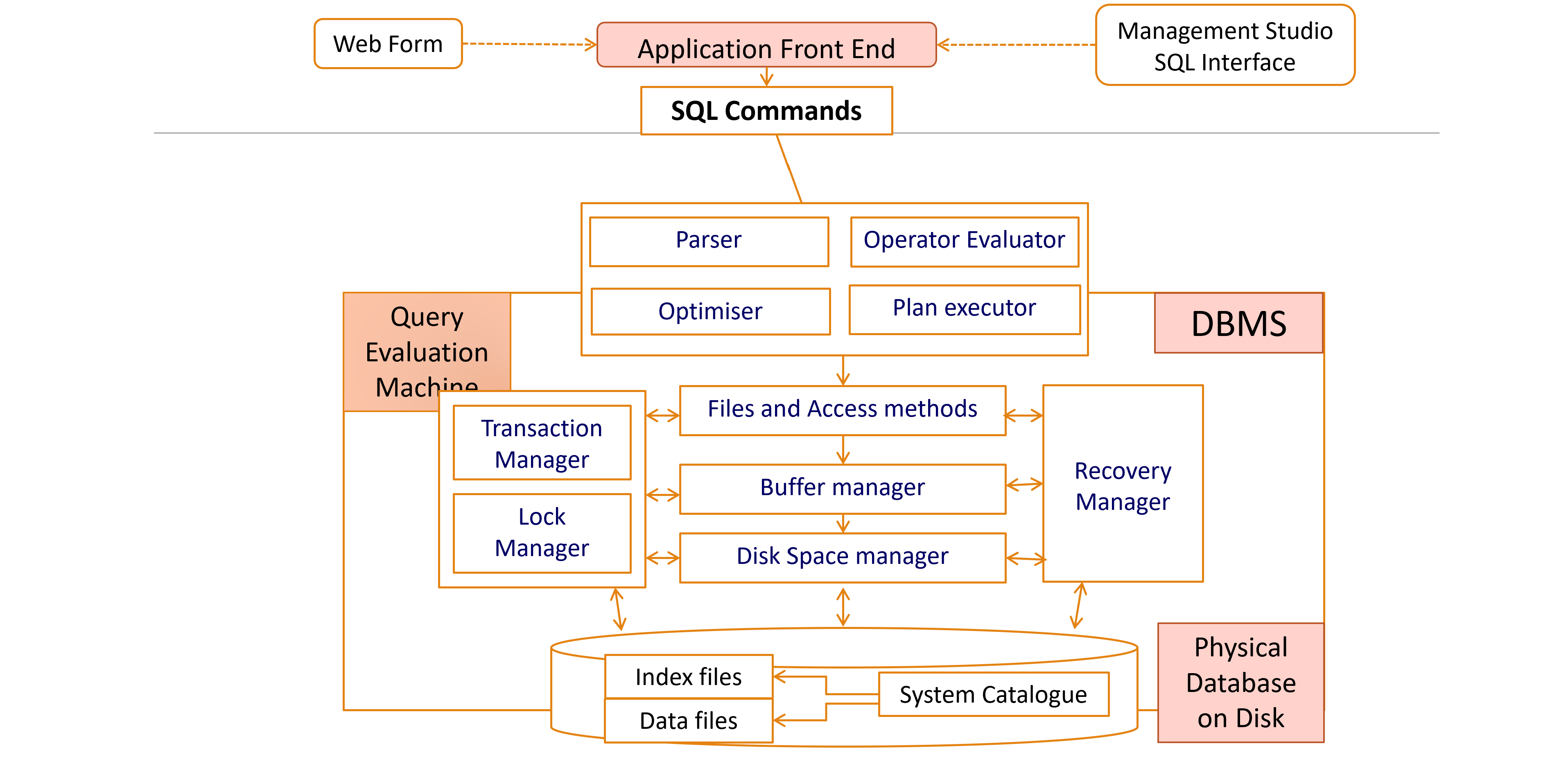 Adapted from Database Management Systems (2000) by Ramakrishnan and Gehrke.
The four key internal components:
Transaction Manager Ensures that all operations within a transaction are executed in the correct order, and that if any operation fails, the database is rolled back to a consistent state. This enforces the ACID properties (Atomicity, Consistency, Isolation, Durability) at the operation level.
Lock Manager Controls concurrent access to data. When multiple users attempt to read or modify the same record simultaneously, the Lock Manager grants, queues, or rejects access requests to prevent dirty reads, lost updates, and write conflicts. Without it, two users updating the same record at the same moment would produce unpredictable results.
Recovery Manager Uses the transaction log maintained by the Transaction Manager to restore the database to a consistent state after a system failure. On restart after a crash, the Recovery Manager replays committed transactions that had not been written to disk and rolls back any that were incomplete.
System Catalogue (Data Dictionary) A metadata store that the DBMS maintains about its own structure. It holds:
- Names, data types, and sizes of all attributes
- Relationship definitions between tables
- User accounts and permission assignments
- Usage statistics used by the query optimiser to select efficient execution plans
The System Catalogue is itself a set of internal relations — the DBMS uses SQL to query its own metadata.