Table of Contents Link to heading
- What Is a Key?
- Super Key
- Candidate Key
- Primary Key
- Unique Key
- Composite Key
- Surrogate Key
- Natural Key
- Foreign Key
- Non-Key Attributes
- Key Type Relationships
What Is a Key? Link to heading
A key in a DBMS is a set of one or more attributes whose values can uniquely identify any given tuple within a relation. Keys are the mechanism by which the relational model enforces uniqueness, establishes relationships between tables, and provides reliable record lookup.
There are eight key types in the relational model, each serving a distinct purpose:
| Key Type | Purpose |
|---|---|
| Super Key | The complete set of all possible unique identifiers |
| Candidate Key | Minimal unique identifiers — eligible to become the Primary Key |
| Primary Key | The chosen unique identifier for the relation |
| Unique Key | A Candidate Key not chosen as PK, enforced by a uniqueness constraint |
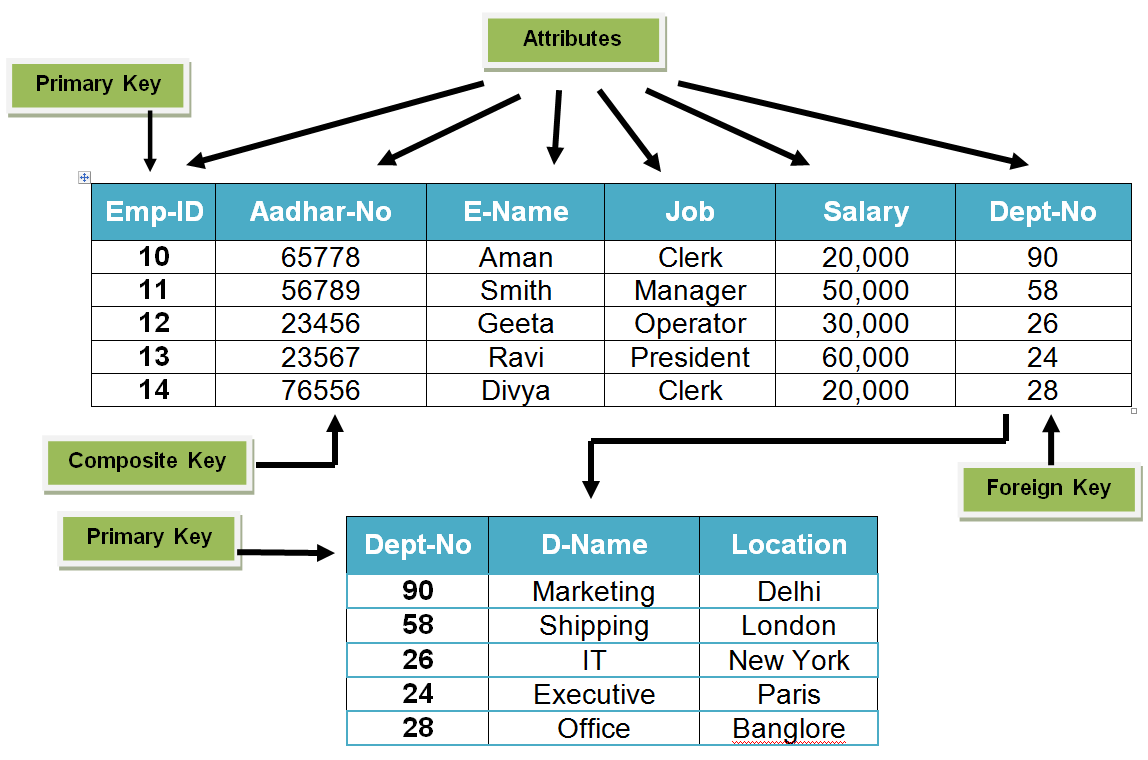
| Composite Key | A key consisting of two or more attributes |
| Surrogate Key | A system-generated artificial identifier with no business meaning |
| Natural Key | A real-world attribute (or combination) that can identify a tuple |
| Foreign Key | An attribute that references the Primary Key of another relation |
Super Key Link to heading
The Super Key is the complete set of all attribute combinations that can uniquely identify a tuple within a relation. By definition, any set of attributes that includes the Primary Key is a Super Key — including the set of all attributes in the table.
Super Keys are the theoretical starting point. In practice, they are never used directly — the goal is to extract from the Super Key the minimal combinations needed, which become the Candidate Keys.
Example — given Student(studentID, email, studentName, mobilePhone):
{studentID}— Super Key{email}— Super Key{studentID, email}— Super Key (but not minimal){studentID, email, studentName}— Super Key (but not minimal)- Every superset of any unique combination is also a Super Key
Candidate Key Link to heading
A Candidate Key is a minimal Super Key — the smallest set of attributes that uniquely identifies every tuple, with no redundant attributes. Removing any attribute from a Candidate Key would break its uniqueness property.
Every relation must have at least one Candidate Key. If multiple Candidate Keys exist, the database designer must choose one as the Primary Key. The others become Unique Keys.
Example:
Student(studentID, email, username, studentName)- Candidate Keys:
{studentID},{email},{username} {studentID, email}is a Super Key but not a Candidate Key —{studentID}alone is sufficient
Primary Key Link to heading
The Primary Key is the Candidate Key selected to be the official unique identifier for a relation. Every relation must have exactly one Primary Key.
Properties:
- Values must be unique across all tuples — no two rows can share a PK value
- Values must be non-null — a tuple with no identifier cannot be uniquely located
- There is exactly one PK per relation — this is a relational model requirement
Given a PK value, the DBMS can retrieve the exact tuple it refers to in O(1) or O(log n) time, depending on whether the PK is indexed (which it always is, by default).
Unique Key Link to heading
A Unique Key is any Candidate Key that was not selected as the Primary Key, but is still enforced as unique by the DBMS via a UNIQUE constraint. Unlike a PK, a Unique Key can contain NULL values (subject to DBMS-specific behaviour).
Example:
Student(studentID, email, username, studentName)- PK:
studentID - Unique Keys:
email,username— each must be unique, but neither was chosen as the PK
In SQL:
CONSTRAINT UQ_Student_Email UNIQUE (email),
CONSTRAINT UQ_Student_Username UNIQUE (username)
Composite Key Link to heading
A Composite Key is any key — including a Primary Key — that consists of two or more attributes combined. No single attribute in a composite key is sufficient to uniquely identify a tuple alone; the combination of all attributes in the key is required.
Composite keys are common in association tables (junction tables) representing many-to-many relationships:
Enrolment(studentID, courseID, dateCommenced, mark)
PK(studentID, courseID)
Neither studentID nor courseID alone is unique in the Enrolment table — a student can enrol in many courses, and a course has many students. Together they form a unique combination.
Surrogate Key Link to heading
A Surrogate Key is an artificially generated identifier with no business meaning — typically an auto-incrementing integer or a UUID assigned by the DBMS when a new row is inserted.
When to use a Surrogate Key:
- No natural attribute (or combination) makes a good Primary Key
- The natural identifier is too large, unstable, or complex for use as a PK
- Referential integrity would be difficult to maintain with a changing natural key
CREATE TABLE Customer (
    customerID   INT          IDENTITY(1,1) PRIMARY KEY,
    email        VARCHAR(200) NOT NULL UNIQUE,
    customerName VARCHAR(100) NOT NULL
);
customerID here is a Surrogate Key — it has no meaning to the business; it exists solely to uniquely identify rows.
Natural Key Link to heading
A Natural Key is a key composed of attributes that have real-world meaning for the entity — as opposed to a system-generated Surrogate Key.
Examples:
emailfor a user table — naturally unique in the real worldISBNfor a book table — a standardised real-world identifierbankAccountNo + telephoneNo— a composite natural key
A Natural Key exists in relation to a Surrogate Key: when a Surrogate Key is added, the original natural identifier is still present in the table as a Unique Key — it is now referred to as the Natural Key.
Foreign Key Link to heading
A Foreign Key is an attribute (or set of attributes) in one relation whose values must match the Primary Key (or Unique Key) of another relation. Foreign Keys implement referential integrity — the guarantee that a reference to a record in another table always points to a record that actually exists.
Terminology:
- The relation containing the FK is the child table
- The relation containing the referenced PK is the parent table
To insert a value into a FK column, the referenced PK value must already exist in the parent table. To delete a row from the parent table, all referencing FK values in child tables must either be deleted first or handled by a cascade rule.
Example:
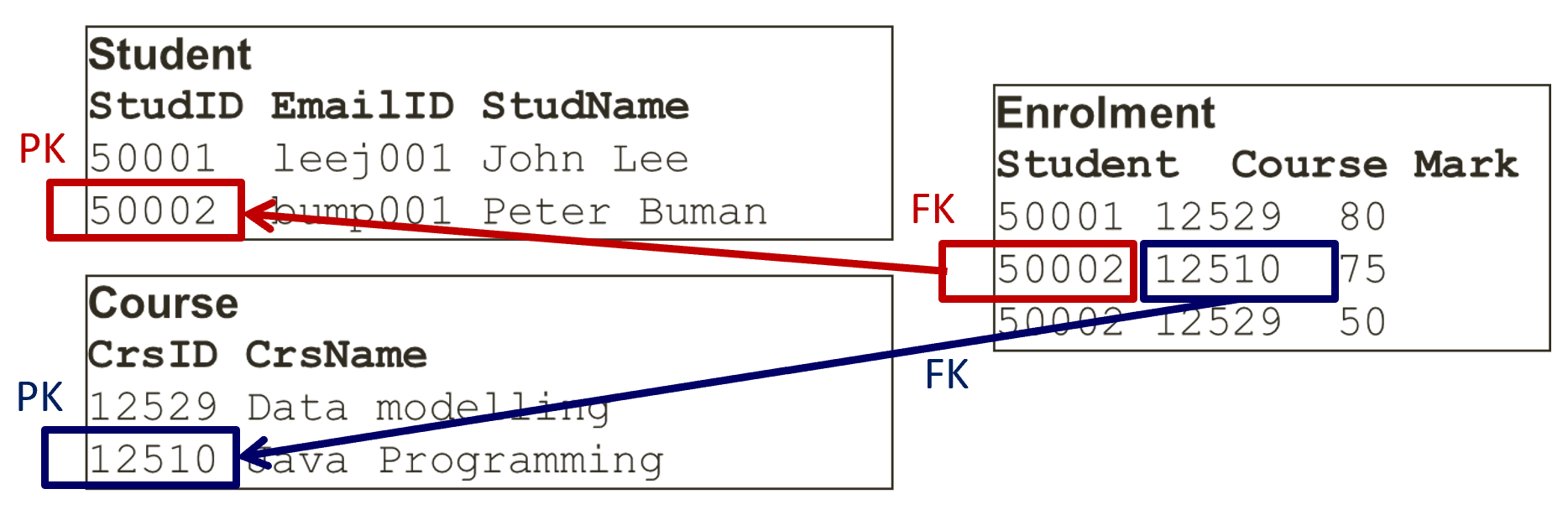
Student(studentID, studentName, email)
PK(studentID)

Course(courseID, courseName)
PK(courseID)

Enrolment(studentID, courseID, mark)
PK(studentID, courseID)
FK(studentID) → Student(studentID)
FK(courseID)  → Course(courseID)
A mark in the Enrolment table has no meaning without a reference to both the student it belongs to and the course it was earned in. The Foreign Keys enforce this relationship at the database level.
Non-Key Attributes Link to heading
A non-key attribute (also called a non-prime attribute) is any attribute that is not part of any Candidate Key. Non-key attributes describe the entity but do not contribute to its unique identification.
In Student(studentID, email, studentName, dateOfBirth, gpa):
studentIDandemailare Candidate Key attributesstudentName,dateOfBirth,gpaare non-key attributes
Non-key attributes are the target of dependency analysis during normalisation — partial and transitive dependencies involving non-key attributes are the primary source of update anomalies in poorly designed schemas.
Key Type Relationships Link to heading
Super Key
    └─ Candidate Key (minimal Super Keys)
            ├─ Primary Key (one chosen CK — non-null, enforced)
            └─ Unique Key (remaining CKs — enforced as unique)

Primary Key
    ├─ Natural Key (when the PK is a real-world attribute)
    └─ Surrogate Key (when the PK is system-generated)

Composite Key (applies to PK, CK, or FK when multi-attribute)

Foreign Key (references PK or Unique Key of another relation)