Table of Contents Link to heading
- Physical Design: From Schema to SQL
- SQL Overview
- Table Creation: CREATE TABLE
- Data Type Selection
- Table Modification: ALTER and DROP
Physical Design: From Schema to SQL Link to heading
Physical design is the final phase of the database design process. The input is a set of validated relational schemas from the logical design phase; the output is executable SQL that creates the database in a DBMS.
SQL (Structured Query Language) is a fourth-generation language (4GL) — declarative rather than procedural. You specify what data to retrieve or what structure to create; the DBMS determines how to do it efficiently.
A complete table creation example:
CREATE TABLE Project (
    projectName VARCHAR(200)    NOT NULL,
    budget      DECIMAL(10, 2)  NOT NULL,
    managerID   INT             NOT NULL,
    CONSTRAINT PK_Project PRIMARY KEY (projectName),
    CONSTRAINT FK_Project_Manager FOREIGN KEY (managerID) REFERENCES Manager (managerID)
);
SQL Overview Link to heading
DDL vs DML Link to heading
SQL commands fall into two broad categories based on what they operate on:
Data Definition Language (DDL) — defines and modifies the structure of the database (schemas, tables, constraints):
CREATE TABLE Employee (
    employeeID  INT          NOT NULL,
    name        VARCHAR(200) NOT NULL,
    birthDate   DATE,
    CONSTRAINT PK_Employee PRIMARY KEY (employeeID)
);
Data Manipulation Language (DML) — adds, modifies, deletes, and retrieves data within the database:
SELECT employeeID, name
FROM Employee
WHERE YEAR(birthDate) >= 1990
ORDER BY name;
Understanding the distinction matters operationally: DDL changes affect the schema and are typically irreversible without planning; DML changes affect data and are rolled back or committed within transactions.
SQL Syntax Conventions Link to heading
SQL keywords are case-insensitive (SELECT = select = SeLECt), but upper-casing keywords is the standard convention — it clearly distinguishes keywords from user-defined names.
Statements are terminated by a semicolon:
SELECT
    S.businessEntityID,
    E.jobTitle
FROM
    Sales.SalesPerson AS S
    INNER JOIN HumanResources.Employee AS E
        ON E.businessEntityID = S.businessEntityID;
SQL ignores excess whitespace — statements can be written on one line or spread across multiple lines. Breaking complex statements across lines with consistent indentation significantly improves readability and maintainability.
Table Creation: CREATE TABLE Link to heading
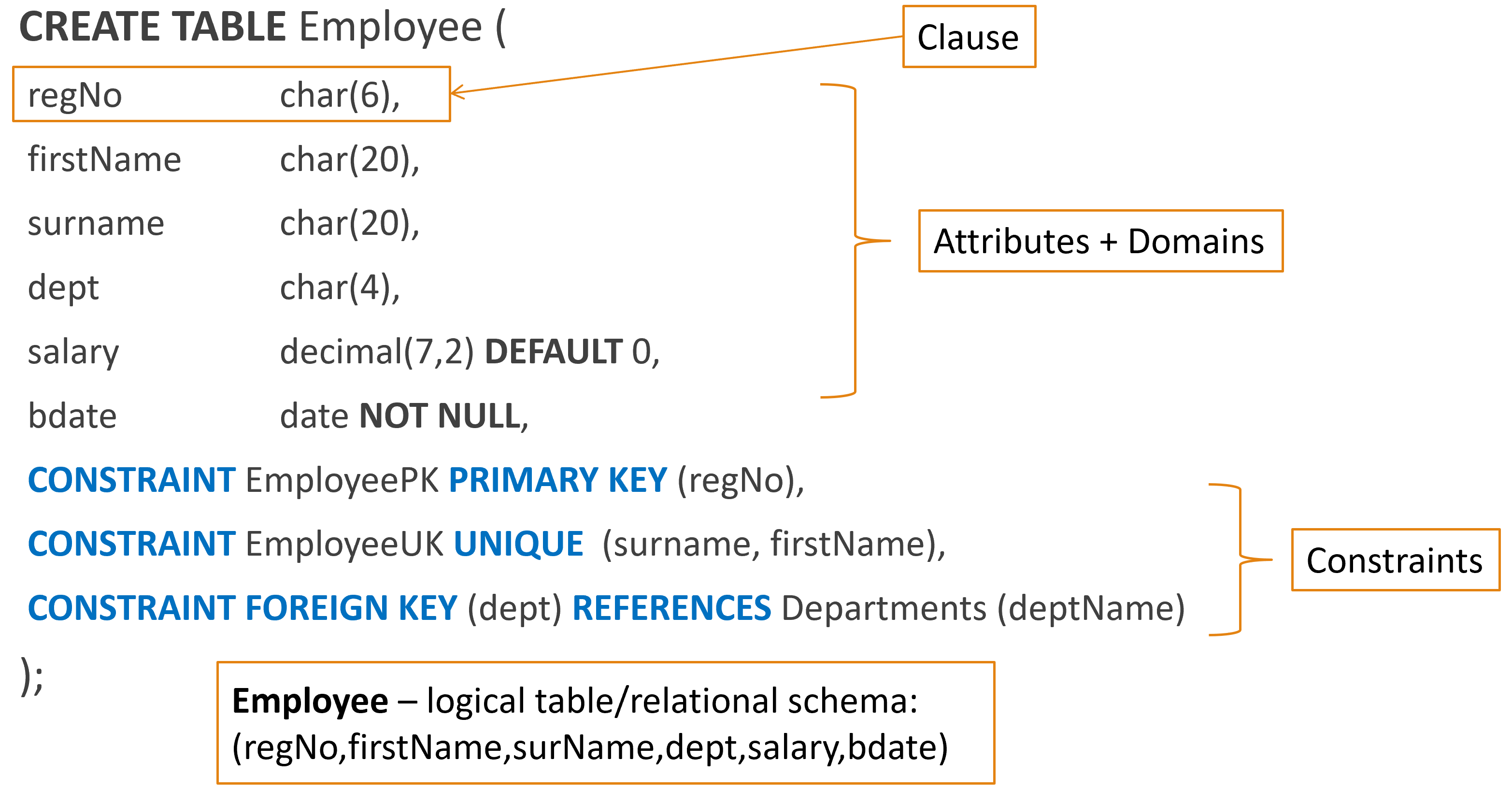
A SQL table consists of an ordered set of attributes. Each attribute must be assigned a data type (its domain) and an optional nullability constraint. Constraints — including PK, FK, and UNIQUE — are defined after the attribute list.
General structure:
CREATE TABLE TableName (
    attribute1  dataType  [NOT NULL],
    attribute2  dataType  [NOT NULL],
    ...
    CONSTRAINT PK_TableName PRIMARY KEY (attribute1),
    CONSTRAINT UQ_TableName_attr2 UNIQUE (attribute2),
    CONSTRAINT FK_TableName_Other FOREIGN KEY (attribute3) REFERENCES OtherTable (otherPK)
);
Naming constraints explicitly (rather than letting the DBMS assign names) makes error messages and schema documentation far more readable. A FK violation error that names FK_Enrolment_Student is immediately actionable; one that names FK__Enrolment__stude__1A2B3C4D is not.
For a full explanation of constraint types and their syntax, refer to the SQL Table Constraints post.
Data Type Selection Link to heading
Choosing the correct data type for each attribute is a physical design decision that has long-term implications for storage efficiency, query performance, and data integrity. The goal is to choose the smallest type that correctly represents all valid values — now and in the future.
decimal(m, n) Link to heading
decimal(m, n) stores a fixed-precision decimal number where m is the total number of digits and n is the number of decimal places.
decimal(5, 2):
  m = 5 total digits
  n = 2 decimal places
  Range: -999.99 to 999.99
decimal conservatively for values that may grow: decimal(6, 2) for a price column only supports values up to $9,999.99. If that column might ever store a wholesale order total, decimal(10, 2) is safer. Under-sizing a decimal column in production requires an ALTER TABLE operation, which on large tables can be slow and disruptive.int Link to heading
int stores whole numbers. Use it only for values where arithmetic operations (+, -, *, ORDER BY numerically) are meaningful.
Do not store these in int columns even though they look like numbers:
- House numbers (
1A,Unit 3B) — not numeric - Phone numbers (
(08),+61,0434 xxx xxx) — not arithmetic - Account numbers (
0041 xxx xxx) — leading zeros are meaningful
For these, use varchar — they are text identifiers, not quantities.
char vs varchar Link to heading
| Type | Behaviour | Use when |
|---|---|---|
char(n) |
Fixed-length, always n characters — pads with spaces |
Length is always exactly n (e.g., ISO country codes: char(2)) |
varchar(n) |
Variable-length, stores actual length up to n |
Most text attributes |
char for attributes used in dropdown lists, comparisons, or UI display. A value stored as char(10) is padded with trailing spaces — 'Road' becomes 'Road '. Equality comparisons against 'Road' (no padding) may fail silently depending on the DBMS and collation settings. Use varchar unless you have a specific reason for fixed-length storage.DEFAULT Values Link to heading
A DEFAULT clause specifies the value inserted into a column when no explicit value is provided in the INSERT statement:
CREATE TABLE Student (
    studentID       INT         NOT NULL,
    studentName     VARCHAR(100) NOT NULL,
    smartStudent    BIT         DEFAULT 1,
    enjoyLearning   BIT         DEFAULT 0,
    enrollmentDate  DATETIME    DEFAULT GETDATE()
);
Defaults are valuable for audit timestamps, boolean flags, and status codes — they reduce application complexity and ensure data completeness without requiring the inserting application to specify every field.
NULL Link to heading
If no DEFAULT is defined and no value is supplied during INSERT, the attribute receives NULL.
NULL in the relational model has a specific meaning distinct from zero, empty string, or any other value. It represents:
- A value that does not yet exist (will be entered later)
- An optional value not relevant to this record
- A value that was never captured
NULL in expressions produces NULL:
'Henry' + NULL = NULL
4 * NULL = NULL
This has significant consequences for queries: a WHERE clause that compares to NULL using = will never match — use IS NULL or IS NOT NULL instead.
-- Correct: finds students with no GPA on record
SELECT * FROM Student WHERE gpa IS NULL;

-- Incorrect: returns no rows
SELECT * FROM Student WHERE gpa = NULL;
When NOT NULL is declared, the DBMS rejects any INSERT or UPDATE that would leave that column without a value:
CREATE TABLE Student (
    studentID   INT          NOT NULL,
    studentName VARCHAR(100) NOT NULL,
    gpa         DECIMAL(3,2)     -- NULL allowed — GPA may not be assigned yet
);

NOT NULL on every column where a missing value is a data quality error — Primary Keys, Foreign Keys, and any attribute that must always be present for the record to be meaningful. Allow NULL only for genuinely optional attributes where the absence of a value is a valid state.Table Modification: ALTER and DROP Link to heading
Schema changes after a table is created use ALTER TABLE (modify the structure) and DROP TABLE (remove the table entirely).
Add a new attribute:
ALTER TABLE Student ADD dateOfBirth DATE;
ALTER TABLE Course  ADD maxClassSize INT DEFAULT 30;
Remove an existing attribute:
ALTER TABLE Student DROP COLUMN dateOfBirth;
Remove a table:
DROP TABLE Student;
DROP TABLE Course;
When dropping tables that are referenced by Foreign Keys, the order of deletion matters. A child table cannot be dropped while its parent table still exists and holds rows that the child references — this would leave orphaned FK values. Drop child tables first, then parents. Alternatively, use CASCADE (where supported) to automatically drop dependent objects:
DROP TABLE Enrolment;  -- child table first
DROP TABLE Student;    -- parent table second
DROP TABLE Course;     -- parent table second
Or with CASCADE:
DROP TABLE Student CASCADE;
Modify an existing attribute’s data type or constraints (syntax varies by DBMS):
-- SQL Server / MS SQL
ALTER TABLE Student ALTER COLUMN studentName VARCHAR(200);

-- MySQL
ALTER TABLE Student MODIFY COLUMN studentName VARCHAR(200);

-- PostgreSQL
ALTER TABLE Student ALTER COLUMN studentName TYPE VARCHAR(200);
For complete syntax reference across DBMS platforms, refer to MSDN ALTER TABLE documentation.