Table of Contents Link to heading
- The Filesystem Hierarchy Standard
- Directory Classification
- Filesystem Hierarchy Structure
- Operational Directory Reference
The Filesystem Hierarchy Standard Link to heading
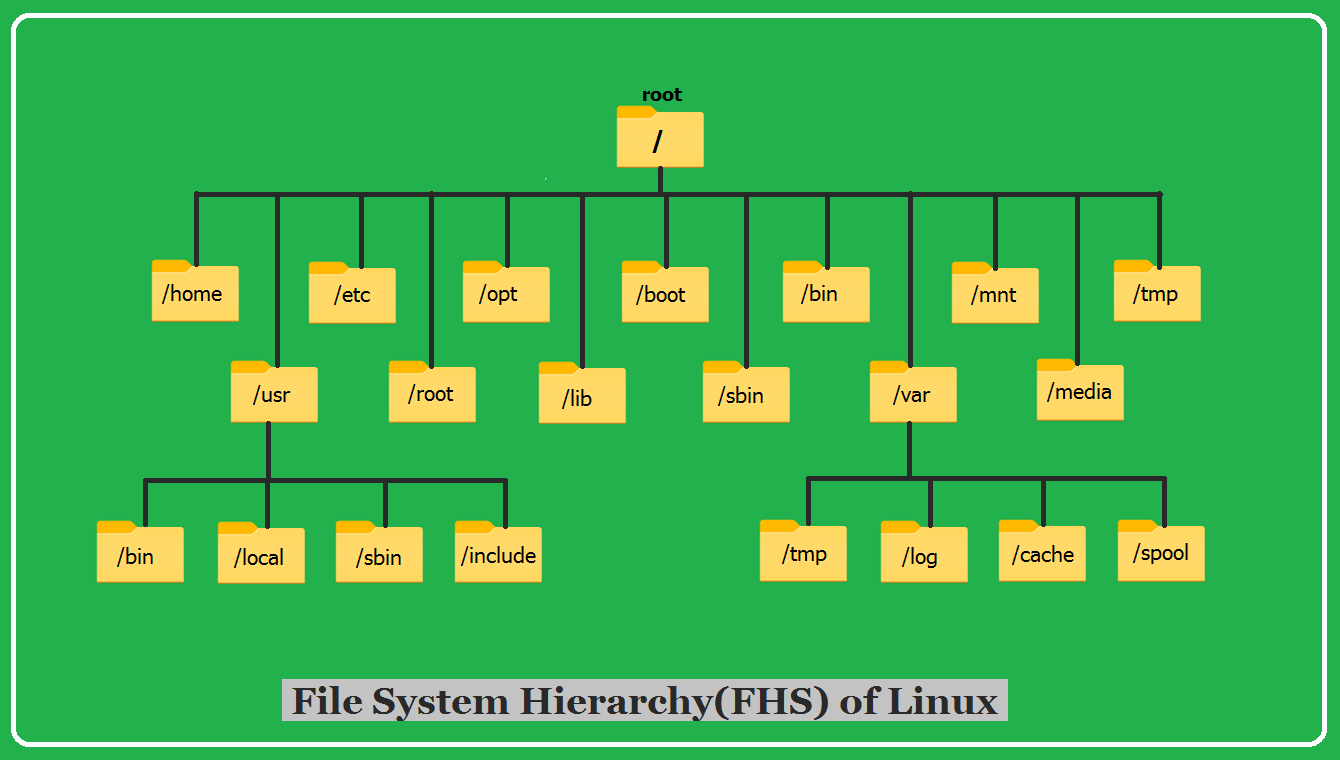
The Filesystem Hierarchy Standard (FHS) defines where different types of files should be placed on a Linux system. Distributions are not required to implement it, but virtually all major distributions comply, which means a sysadmin familiar with the FHS can navigate any compliant system without needing to memorise distribution-specific layouts.
Understanding the FHS has direct operational value: when troubleshooting, you know where to find log files (/var/log), configuration files (/etc), binaries (/usr/bin, /usr/sbin), and temporary storage (/tmp, /var/tmp) without guessing.
Directory Classification Link to heading
The FHS classifies directories along two axes:
By shareability: Can the directory be NFS-mounted and shared across multiple machines?
- Shareable:
/usr(read-only software),/opt,/var/mail— content that can be served from one host to many - Not shareable:
/etc(host-specific config),/var/lock— content that must be local to each machine
By variability: Does the content change during normal operation?
- Static: binaries, libraries, documentation — content that only changes when explicitly updated
- Variable: logs, spools, caches — content that changes as the system runs
| Not Shareable | Shareable | |
|---|---|---|
| Variable | /var/lock |
/var/mail |
| Static | /etc |
/opt |
Filesystem Hierarchy Structure Link to heading
The hierarchy has four main levels of organisation. The root filesystem and everything under it is required to boot the system; the /usr and /var hierarchies may be on separate partitions and may not be available until after the root filesystem is mounted.
Top-Level (Root) Hierarchy: / Link to heading
| Directory | Contents and Purpose |
|---|---|
/ |
Root of the entire filesystem — all other directories are beneath this |
/bin |
Essential user binaries required for single-user mode (ls, cp, rm, cat, bash) |
/boot |
Bootloader files, Linux kernel image, and kernel configuration |
/dev |
Device files — block devices (/dev/sda), character devices (/dev/tty), virtual devices (/dev/null, /dev/zero) |
/etc |
Host-specific system configuration files — no binaries belong here |
/home |
User home directories (one per user account) |
/lib |
Shared libraries required by /bin and /sbin executables |
/lib64 |
64-bit shared libraries for AMD/Intel x86_64 architecture |
/media |
Mount point for removable media automatically mounted by the system (USB drives, optical discs) |
/mnt |
Mount point for temporarily mounting filesystems manually |
/opt |
Optional third-party software packages installed outside the distribution’s package management |
/proc |
Virtual filesystem exposing kernel and process information as files (not stored on disk) |
/root |
Home directory for the root user (separate from /home to ensure root access during recovery) |
/run |
Runtime data for processes started since the last boot (PID files, lock files, socket files) |
/sbin |
Essential system administration binaries primarily used by root (fdisk, ifconfig, mount) |
/srv |
Data served by the system — web content, FTP files |
/sys |
Virtual filesystem for hardware device information and kernel parameters (sysfs) |
/tmp |
Temporary files; world-writable, typically cleared at boot |
/usr |
Secondary hierarchy for user programs and data (see below) |
/var |
Variable data that changes during system operation (see below) |
/bin, /sbin, and /lib are often symlinks to /usr/bin, /usr/sbin, and /usr/lib respectively. This “UsrMerge” simplifies the directory structure by consolidating all non-essential binaries and libraries under /usr.Second-Level Hierarchy: /usr Link to heading
/usr holds the majority of user-facing programs and data. It is the largest directory on most systems and is frequently mounted read-only and shared across multiple machines via NFS.
Key subdirectories:
| Directory | Contents |
|---|---|
/usr/bin |
Non-essential user binaries (most commands you run daily) |
/usr/sbin |
Non-essential system administration binaries |
/usr/lib |
Libraries for /usr/bin and /usr/sbin |
/usr/share |
Architecture-independent data: man pages, documentation, icons, locale files |
/usr/include |
C header files for development |
/usr/local |
Third-level hierarchy for locally compiled software (see below) |
Third-Level Hierarchy: /usr/local Link to heading
/usr/local mirrors the /usr structure and is intended for software compiled and installed locally — software not managed by the distribution’s package manager. This prevents custom software from conflicting with distribution-managed packages.
/usr/local/bin      # locally installed executables
/usr/local/lib      # locally installed libraries
/usr/local/etc      # configuration for locally installed software
/usr/local/share    # architecture-independent data for local software
When you compile software from source and run make install, it typically installs into /usr/local by default.
Fourth-Level Hierarchy: /var Link to heading
/var contains files whose content changes continuously during system operation — log files grow, mail spools accumulate, cache data is written and expired.
| Directory | Contents |
|---|---|
/var/log |
System and application log files — the most operationally important /var subdirectory |
/var/cache |
Application cache data that can be regenerated if deleted |
/var/lib |
Persistent application state data (database files, package manager state) |
/var/lock |
Lock files preventing concurrent access to resources |
/var/run |
(Often symlinked to /run) PID files and runtime state |
/var/spool |
Queued data awaiting processing — print jobs, mail queues |
/var/tmp |
Temporary files preserved across reboots (unlike /tmp) |
/var is not on a separate partition, rapidly growing log files or spool directories can fill the root filesystem, causing system instability or crashes. In production, /var should be on its own partition, and log rotation (logrotate) must be configured for all active log files.Operational Directory Reference Link to heading
User Home Directories: /home Link to heading
Each user account has a dedicated directory under /home with the same name as the username. A user has full ownership of their home directory and can create, modify, and delete any files within it.
Without special permission grants, a regular user can only write to:
- Their home directory (
/home/username/) /tmpand/var/tmp(world-writable temporary directories)
Binary and Command Directories Link to heading
Linux separates binaries across several directories based on their audience and whether they are essential for system recovery:
| Directory | Audience | Essential for boot? | Managed by |
|---|---|---|---|
/bin |
All users | Yes | Distribution |
/sbin |
Root/admin | Yes | Distribution |
/usr/bin |
All users | No | Distribution |
/usr/sbin |
Root/admin | No | Distribution |
/usr/local/bin |
All users | No | Local admin |
/usr/local/sbin |
Root/admin | No | Local admin |
Third-party applications may also install binaries to /opt/applicationname/bin or /usr/local/application/bin.
If a command is not found, check whether its directory is in the current PATH variable:
echo $PATH
which command_name      # shows which directory the shell finds it in
Library Directories Link to heading
Libraries (.so — shared object files) follow the same essential/non-essential split as binaries:
| Directory | Supports |
|---|---|
/lib, /lib64 |
Essential binaries in /bin and /sbin |
/usr/lib, /usr/lib64 |
Non-essential binaries in /usr/bin and /usr/sbin |
/usr/local/lib |
Locally compiled software |
/opt/application/lib |
Third-party applications |
Multiple versions of the same library may coexist — different applications may require different versions, and both 32-bit and 64-bit versions may be present on 64-bit systems.
Software Application File Locations Link to heading
Unlike Windows (where an application typically installs all files to a single directory under Program Files), Linux applications distribute files across the FHS:
| Content type | Location |
|---|---|
| Executable binaries | /usr/bin, /usr/local/bin, /opt/app/bin |
| Application data | /usr/share, /usr/lib, /opt/app, /var/lib |
| Documentation | /usr/share/doc, /usr/share/man, /usr/share/info |
| Global configuration | /etc/appname/ |
| User-specific configuration | ~/.config/appname/ or ~/.appname` |
To find all files belonging to an installed package:
dpkg -L packagename         # Debian/Ubuntu
rpm -ql packagename         # Red Hat/RHEL/CentOS
Variable Data and Log Directories Link to heading
/var/log is the primary location for log files. Key logs:
| Log file | Contents |
|---|---|
/var/log/syslog |
General system messages (Debian/Ubuntu) |
/var/log/messages |
General system messages (RHEL/CentOS) |
/var/log/auth.log |
Authentication events, sudo usage, SSH logins |
/var/log/kern.log |
Kernel messages |
/var/log/nginx/ |
Web server access and error logs |
/var/log/apt/ |
Package installation history |
Logs are managed by logrotate, which compresses and rotates log files on a schedule. Compressed logs use .gz extension and can be read with zcat or zless.